Door/Window Contact II (Plus) help
Questions about your Door/Window Contact II (Plus)?
Questions about your Door/Window Contact II (Plus)? You can find installation videos, instructions and answers to frequently asked questions here.
Door/Window Contact II - Installation
Door/Window Contact II - Installation
The sensor unit of the Bosch Smart Home Door/window contact II should be mounted in the upper area of the frame. The magnet can be positioned either on the side of or on top of the window sash or door leaf. Various positions are possible for mounting.
When mounting, make sure that the marking line on the magnet and the gap on the sensor unit form a line. The distance between the sensor unit and the magnet must not exceed 15mm.
Note:Correct alignment is crucial for reliable operation.
Click here for the installation video on the Bosch Smart Home YouTube channel:
https://www.youtube.com/watch?v=EiRm5kQk1sw&list=PLvRPsBHOFEs_HUC7drTwlvDcIzyCQlRo9&index=23
In order for your Bosch Smart Home Door/window contact II plus to detect vibrations, place the sensor unit on the window sash or door leaf (in the upper area in each case). The magnet is positioned on the frame. The distance between the magnet unit and the sensor unit must not exceed 15mm.
Important for positioning the magnet unit:
1. Ensure that the bottom edges of the sensor unit and magnet unit as well as the gaps of the units form a line. If no line is formed, the magnet unit must be rotated 180°. (Bottom edge of sensor unit = side on which the control button is located)
2. The top sides of the sensor and magnet unit must be on the same level. Therefore, use the supplied spacer elements for the magnet for height adjustment if necessary.
Note: Correct alignment is crucial for reliable operation.
Click here for the installation video on the Bosch Smart Home YouTube channel:
https://www.youtube.com/watch?v=ikgQqMrV0uE&list=PLvRPsBHOFEs_HUC7drTwlvDcIzyCQlRo9&index=24
No. The control button can be oriented upwards, downwards or sideways. The correct orientation of the magnet is important.
When attaching the Door/window contact II or Door/window contact II plus with adhesive strips, the ambient temperature at the time of installation must not be below 10° C.
Door/Window Contact II - Operations
Door/Window Contact II - Operations
In the alarm system:
After pairing the Bosch Smart Home Door/Window Contact II Plus, vibration detection is automatically activated in the alarm system in all alarm profiles. If this is not desired, the setting can be individually adjusted in the alarm profile. Please note: If vibration detection is permanently deactivated in the device settings, then vibration detection is also not available as a trigger in the alarm system.
In automations:
Vibration detection can serve as a trigger for individually created automations.
Whether a vibration has been detected can be found out via the favorites screen in the Bosch Smart Home App.
- If the icon for vibration detection is grayed out, detection is activated but no vibration has been detected.
- If the icon is white and "active", a vibration has been detected.
- If no vibration is detected for 30 seconds, the icon will be grayed out again. If the icon is grayed out and crossed out, vibration detection is permanently deactivated.
The Bosch Smart Home Door/window contact II plus not only reliably detects open doors and windows and displays their status in the Smart Home app, but also responds to slight vibrations thanks to its vibration sensor.
This allows it to be used as aPart of the alarm systemto trigger an alarm even during break-in attempts when vibrations are detected at the window. It also warns of potential security gaps caused by forgotten windows/doors when activating the alarm system. In addition, the status of the Door/window contact II can be used as aTrigger for actions.
The button of the Door/window contact II plus is multifunctional:
- Short and long button presses can be individually assigned via the app as triggers for actions or scenarios.
- The pause function can be used with a double-click. This allows the window/door to be opened once without triggering an alarm or turning down the heating – practical, for example, to let the cat out briefly despite the alarm system being activated or to ventilate at night.
Of course, the smart sensor can also be used for energy and cost efficiency: In the "Sustainable ventilation" service, radiator thermostats in the room are automatically throttled when windows are open.
Integration with Apple HomeKit, Amazon and Google Home also enables combination with many compatible devices from other manufacturers.
The Bosch Smart Home Door/window contact II can be used multifunctionally:
- In the "Sustainable Ventilation" service, the radiator thermostats in the room are automatically reduced when windows are open, which saves energy and costs.
- As part of the alarm system, it triggers an alarm when doors/windows are opened without authorization – and also warns of possible security gaps caused by forgotten windows/doors when activating the alarm system.
- In addition, the status of the Door/window contact II can be used as a trigger for actions.
The button of the Door/window contact II is also multifunctional:
- Short and long button presses can be individually assigned via app as triggers for actions or scenarios.
- The pause function can be used by double-clicking. This allows the window/door to be opened once without triggering an alarm or reducing the heating – practical, for example, to let the cat out briefly despite the alarm system being activated or to ventilate at night.
Integration into Apple HomeKit, Amazon and Google Home also enables combination with many compatible devices from other manufacturers.
The pairing mode was not successful or a process has failed.
After pairing the Bosch Smart Home Door/Window Contact II Plus, vibration detection is automatically activated in the alarm system for all alarm profiles. If vibration detection is not displayed there as a separate trigger, it is permanently deactivated for this Door/Window Contact II Plus.
To make it available again, open the Bosch Smart Home App, navigate to the device settings and select the corresponding Bosch Smart Home Door/Window Contact II Plus. In the settings, you now have the option to activate vibration detection again.
A malfunction has been detected. Follow the instructions in the Bosch Smart Home App or contact the
.The pause function is active. To change the status, open and close the door or window once.
The device is maintenance-free. A soft, clean, dry and lint-free cloth can be used for cleaning. The use of solvent-based cleaning agents should be avoided.
The pairing mode or a process was successfully completed.
To adjust the sensitivity of the Bosch Smart Home Door/window contact II Plus with regard to vibration detection, open the Bosch Smart Home App, navigate to the device settings and select the corresponding Bosch Smart Home Door/window contact II Plus. In the settings you now have the option to select different sensitivity levels.
Yes. This setting can be deactivated in the device settings of the Bosch Smart Home App.
To increase the range of the devices, you can place a Bosch Smart Home Compact Smart Plug, a Bosch Smart Home Light Control II/Shutter Control II, a Room Thermostat II 230V, or a Ledvance light halfway between them.
To reset the Bosch Smart Home Door/Window Contact II and the Bosch Smart Home Door/Window Contact II Plus to factory settings, proceed as follows:
1. Remove the battery.
2. While reinserting the battery, press and hold the control button until the status LED flashes orange.
3. Release briefly.
4. Press and hold the control button again until the status LED lights up green.
5. Open the Bosch Smart Home App and remove the corresponding device in the device settings. The device can now be paired again.
If the status LED lights up red during the process, remove the battery and restart the process.
Hereto access the reset video on the Bosch Smart Home YouTube channel:
https://www.youtube.com/watch?v=nAMfdM_ig8U&list=PLvRPsBHOFEs-_jLRx2a58Fpcv4dNp5Wm9&index=15
The pairing mode is active or the device is communicating with the Bosch Smart Home Controller.
You can tell whether the pause function is currently active as follows:
1. Display on the tile on the favorites screen in the Bosch Smart Home App
2. Message in the Message Center in the app, which is only displayed while the pause is active
3. If desired, via the "Open Doors and Windows" widget (iOS) or push notification (Android)
4. Orange flashing of the LED on the device (flashing behavior depends on the selected setting - information on this can be found in the device settings of the respective door/window contact)
Yes. In the device settings of the Bosch Smart Home App, you can permanently deactivate the vibration detection.
On the one hand, this increases battery life, but on the other hand, vibration detection is no longer available as a trigger for the alarm system and automations.
Door/Window Contact II - General Information
Door/Window Contact II - General Information
The ZigBee 3.0 radio protocol is used.
The battery life of the Bosch Smart Home Door/Window Contact II is up to 5 years.
The battery life of the Bosch Smart Home Door/window contact II plus is up to 3 years.
The spacer elements of the Bosch Smart Home Door/window contact II plus are located in the box under the sensor unit and the magnet unit.
The Bosch Smart Home Door/window contact II as well as the Bosch Smart Home Door/window contact II plus has the protection class IP 45 and is therefore suitable for outdoor use.
Please note that the permissible ambient temperature is between -20°C and +60°C.
If the Bosch Smart Home Door/window contact II or Bosch Smart Home Door/window contact II plus is used outdoors, please check whether a Bosch Smart Home Compact Smart Plug, a smart Ledvance light or the Bosch Smart Home Light/Shutter Control II needs to be placed halfway between the device and the Bosch Smart Home Controller to rule out range problems. If use outdoors is desired for the alarm system, the use of the Door/window contact II plus is recommended. If vibration detection is activated in the alarm system, it will immediately trigger an alarm in case of unauthorized opening or removal.
A 3V CR123A Li battery is used.
The Bosch Smart Home Door/window contact II plus reliably detects open doors and windows, displays the current status (open/closed) in the app, and triggers a variety of reactions as desired: e.g., throttling smart radiator thermostats for sustainable ventilation or alarms and security warnings in the smart alarm system.
Thanks to an additional vibration sensor, it also detects even slight vibrations. As part of the alarm system, it can trigger an alarm during break-in attempts when vibrations are detected at the window.
The button can serve as an additional control element for triggering freely definable actions or scenarios, or it can also temporarily pause a function in a targeted manner.
Integration into Apple HomeKit, Amazon, and Google Home also enables combination with compatible products from other manufacturers.*
*For partner integration, the Bosch Smart Home Controller including the Bosch Smart Home App (iOS, Android) is required.
The Bosch Smart Home Door/window contact II reliably detects open doors and windows, displays the current status (open/closed) in the app and triggers a variety of reactions as desired: e.g. throttling smart radiator thermostats for sustainable ventilation or alarm and security warnings in the smart alarm system.
The button can serve as an additional control element for triggering freely definable actions or scenarios or also pause a function temporarily in a targeted manner.
Integration into Apple HomeKit, Amazon and Google Home also enables combination with compatible products from other manufacturers.*
*For partner integration, the Bosch Smart Home Controller including Bosch Smart Home App (iOS, Android) is required.
While the Bosch Smart Home Door/window contact II detects open and closed doors and windows using a small magnet that can be discreetly mounted, the Bosch Smart Home Door/window contact II plus detects not only open and closed doors and windows but also - thanks to an additional vibration sensor - vibrations. This makes the Door/window contact II plus particularly suitable for windows and doors that are predestined for burglary (e.g. balcony or patio doors).
If outdoor use is desired for the alarm system, the use of the Door/window contact II plus is recommended. If vibration detection is activated in the alarm system, it immediately triggers an alarm in case of unauthorized opening or removal.
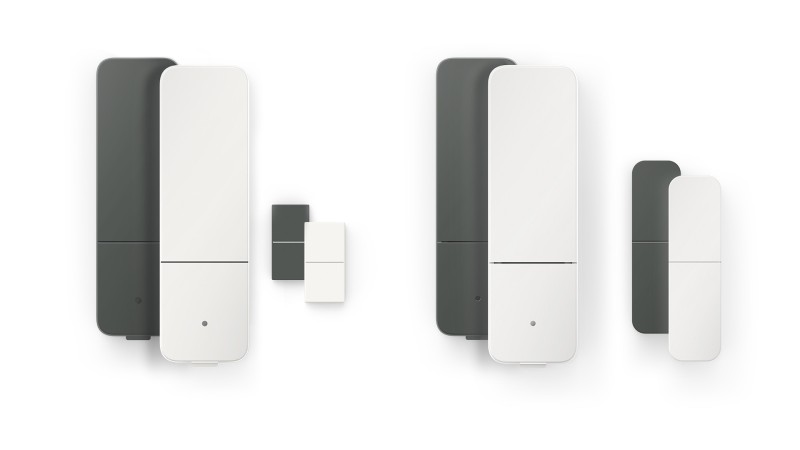
The Bosch Smart Home Door/window contact II and the Bosch Smart Home Door/window contact II plus are each available inwhite andanthracite available.
Double-click:A double press activates the pause function.
Short press:A short press triggers an individually defined automation or scenario.
Long press:A long press triggers an individually defined automation or scenario.
To edit the pause function, open the device settings of the corresponding device. To define the control button for automations and scenarios, open the "Scenarios" section in the Bosch Smart Home App and then "Automations". Here you can now select the corresponding device and then add the press as a trigger for an automation.
Yes. Due to the flexible mounting options of the magnet on the Bosch Smart Home Door/window contact II and the included spacer elements on the Bosch Smart Home Door/window contact II plus, mounting on multi-glazed windows is easily possible.
By double-clicking the control button on the Bosch Smart Home Door/window contact II or on the Bosch Smart Home Door/window contact II Plus, you activate the so-called pause function.
This causes the device status to be temporarily ignored by the Bosch Smart Home system. This allows you to open and close the window or door once without triggering an alarm when the alarm system is activated, turning down the heating, or starting an automation.
The function is particularly helpful when the alarm system is activated, for example to quickly let the dog or cat out or to tilt the window at night for fresh air.
You also have the option to set an automatic time limit. After the time limit expires, the pause ends automatically. You can set the time limit in the device settings of the corresponding device in the Bosch Smart Home app. If no automatic time limit is set/activated, the pause continues until you open and close the window once again. Please note that when the pause function with time limit is activated, the LED on the device flashes orange continuously as long as the pause is active. If no automatic time limit is set, the LED only flashes orange 3 times after the pause has been activated.
You can integrate the Bosch Smart Home Door/Window Contact II and the Bosch Smart Home Door/Window Contact II Plus into Amazon Alexa, Google Assistant and Apple HomeKit.
The prerequisite for integration is the Bosch Smart Home Controller including the Bosch Smart Home App (iOS, Android).
For the Bosch Smart Home Door/window contact II, the magnet is available in white (8-750-002-148) as well as in anthracite (8-750-002-149). The scope of delivery additionally includes 1x adhesive strip for the sensor unit.
In ourWebshopyou will find all available spare parts.
For the Bosch Smart Home Door/window contact II plus, the magnet unit with two spacer elements is available in white (8-750-002-151) and in anthracite (8-750-002-150). The scope of delivery additionally includes 1x adhesive strip for the magnet unit and 1x adhesive strip for the sensor unit.
In ourWebshopyou will find all available spare parts.
Get in touch with us.
A personal and professional service is important to us. If you have any questions or need professional personal support, please do not hesitate to contact us.