Twinguard help
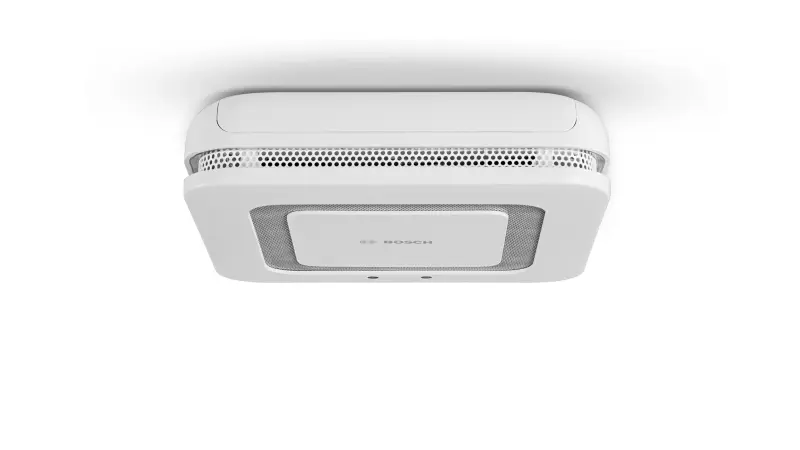
Questions about your Twinguard?
You can find installation videos, instructions and answers to frequently asked questions here.
Videos
Helpful videos for your device. You can find more helpful videos on our YouTube channel under the following link: @BoschSmartHome
Twinguard - Installation
Twinguard - Installation
Connection problems of the Twinguard with the Bosch Smart Home Controller
If your Twinguard is having difficulty connecting to the Bosch Smart Home Controller, you can try the following steps:
1. Attempt reconnection:Press and hold the control button on the Twinguard for more than four seconds. The Twinguard will then attempt to reconnect to the Smart Home Controller.
2. Move closer to the Controller: Try moving the Twinguard closer to your Smart Home Controller and restart the search. The range of the Controller is roughly comparable to that of your Wi-Fi router.
3. Reset to factory settings: If the two previous steps were not successful, reset the Twinguard to factory settings and restart the installation.
For further support, you can watch our reset video in this article or on ourBosch Smart Home Youtube Channel.
Installation of the Bosch Smart Home Twinguard
Installing the Bosch Smart Home Twinguard is a simple process that you can carry out using the Bosch Smart Home App. You will also need an already installed Smart Home Controller and the accessories that come with the Twinguard. Here are the basic steps:
1. Bosch Smart Home App: Open the app on your smartphone or tablet. The app will guide you through the individual installation steps.
2. Smart Home Controller: Make sure that your Smart Home Controller is already installed and operational.
3. Accessories:Use the included accessories for installing the Twinguard.
For a visual guide, you can watch our installation video in this article or on ourBosch Smart Home Youtube ChannelPlease also refer to theOperating/Installation Instructions,that came with your Twinguard to ensure that you complete all steps correctly.
Calibration of the air quality sensor in the Twinguard
After installing the Twinguard, the air quality sensor needs a certain amount of time to calibrate. Here are the key points you should know:
1. First measurements: The sensor needs up to two hours after installation to perform the first measurements.
2. Recalibration:Within the first 48 hours after commissioning, the sensor performs a recalibration to optimize the quality of the collected data.
Please be patient while the sensor performs these calibration processes. After that, you should be able to see the air quality measurements in your app.
Mounting the Bosch Smart Home Twinguard
Mounting the Bosch Smart Home Twinguard is simple and requires only a few steps:
1. Preparation: Choose a suitable location for the Twinguard. This should be a place where smoke can be detected quickly, such as near bedrooms or living areas.
2. Attach the mounting plate:Use the included dowels and screws to attach the mounting plate to the ceiling. Please note that the Twinguard is not designed for adhesive mounting.
3. Attach the Twinguard:Place the Twinguard onto the mounting plate and turn it clockwise until it clicks into place.
For more detailed instructions and safety information, we recommend that you consult the includedUser manual.
Twinguard calibration time
After initial installation, the Twinguard requires approximately 15 to 20 minutes to calibrate itself. During this time, the device captures the current conditions in your home to enable accurate air quality measurements. Please be patient during this process.
Twinguard - Operations
Twinguard - Operations
Resetting the Bosch Twinguard to factory settings
If you would like to reset your Bosch Twinguard to factory settings, please follow these steps:
1. Remove battery: Remove at least one battery from the device. Wait 20 seconds or briefly press the control button on your Twinguard after removing the battery. This ensures that the factory reset can be successfully performed.
2. Insert battery: Reinsert the battery while holding down the control button.
3. Start detector:The detector will now start and the light will flash orange rapidly.
4. Release control button and press again:Briefly release the control button and then press it again for at least four seconds until you hear a short acoustic signal and see a green light flash once. This indicates that the factory settings of your Bosch Twinguard have been successfully restored.
5. Restart Twinguard:The Twinguard will now restart and is in pairing mode, which means it can now be connected to the app again.
For a visual guide, you can watch our reset video in this article or on ourBosch Smart Home Youtube Channel. We hope this guide is helpful for you.
Moving the Twinguard to another room
If you want to move your Twinguard to another room, there are some steps you should follow to ensure that it works correctly and has the optimal settings for the new room.
Hardware Removal/Mounting
Please follow the instructions in theUser manualfor removing and reattaching the device.
Adjusting the app settings
1. Remove the Twinguard from the app: Select the Twinguard you want to mount in another room and remove it from the app.
2. Reset the detector to factory settings:This ensures that all previous settings are deleted.
3. Add the detector in the new room:Now you can add the detector in the app for the new room. This ensures that the correct optimal ranges for air quality and the correct detector sensitivity are set.
Please note that moving to a new room will result in the loss of the air quality data history from the previous room. If you only want to change the name of the room, you can do this at any time directly in the Bosch Smart Home app.
For further support, you can watch our reset video in this article or on ourBosch Smart Home YouTube Channel.
Integration of the Bosch Smart Home Twinguard into the Bosch Smart Home alarm system
Yes, you can easily integrate the Bosch Smart Home Twinguard into your Bosch Smart Home alarm system. Here are the steps you need to follow:
1. Activate the alarm system service: You can find this under the menu item "Services" in your Bosch Smart Home App.
2. Set the acoustic alarm:In the alarm system, you must set the action "Acoustic alarm" to "On".
Once these settings have been made, all connected Bosch Smart Home smoke detectors and Twinguards will emit an acoustic signal when the alarm is triggered.
If you have any further questions or need help with the integration, accessibility, or use of the device, ourCustomer Supportis available to assist you.
Using Twinguard in automations
Yes, you can use your Twinguard in automations. The various measurement values of the Twinguard can serve as triggers for these automations. Here are the steps you need to follow:
1. Open the scenarios:Go to "Scenarios" in your app and then to "Automations".
2. Add an automation: Select "Add automation".
3. Set the conditions:Under "IF" select your desired parameter and under "THEN" the desired reaction. For example: IF "Air quality moderate", THEN turn on "Smart Plug".
This way you can use your Twinguard to trigger automatic actions in your smart home.
Removing a Twinguard via the app
If you remove a Twinguard via the app, all associated data will be deleted from your Bosch user account in the Bosch Cloud. This includes:
1. All data you entered during system commissioning.
2. All historical air quality data recorded over time.
Please note that this action cannot be undone. However, your Bosch user account will remain, even if all Twinguard-specific data is deleted.
Twinguard is no longer transmitting air quality data
If your Twinguard is no longer transmitting air quality data and you receive a battery warning in the app, this is probably because the batteries are almost empty. In this case, the Twinguard switches off the air quality sensor to use the remaining battery power for the smoke alarm function.
Battery warning in the app
If the app displays a "battery empty" icon, this means that the batteries will be empty within the next 30 days. During this time, the Twinguard will continue to function as a smoke alarm.
Inserting new batteries
As soon as you insert new batteries, the air quality sensor will be automatically reactivated. Don't forget to perform a test alarm after inserting the new batteries to ensure that the Twinguard is working properly.
Battery change alarm of the Twinguard
When the batteries of the Twinguard are running low, the device will warn you in various ways:
1. 35 days before the battery runs out:A notification will be displayed in the app, informing you that the batteries need to be replaced soon. Additionally, the LED strip of the Twinguard will light up orange.
2. 30 days before the battery runs out:The Twinguard will start beeping loudly to alert you to the low battery level.
Although the batteries will last approximately 30 more days after the second warning, we recommend replacing them as soon as possible to ensure uninterrupted operation of the Twinguard.
Gaps in the Twinguard's air quality measurements
If you notice gaps in the charts of your Twinguard's air quality measurements, there can be various reasons. Here are the most common:
1. Restart or update of the Smart Home Controller:During a restart or update, a brief interruption of approximately 15 minutes may occur.
2. Unstable connection between Smart Home Controller and Twinguard:Sources of interference such as Wi-Fi or other electrical devices can affect the connection.
3. Large distance between Smart Home Controller and Twinguard:If the devices are too far apart, a Compact Intermediate Plug can help extend the range.
4. Almost empty battery of the Twinguard:When the batteries are almost empty, the Twinguard turns off the air quality measurement to continue ensuring smoke alarm functionality.
5. End of recording history reached:Data from the last 90 days is stored. Older data is not displayed.
Please note that the smoke alarm function works even during a connection interruption. However, a connection to the Smart Home Controller is necessary to alert other smoke detectors in the system and to send a notification to your smartphone.
Help with flashing and fault codes for the Twinguard
If your Twinguard shows unusual flashing patterns or does not function as expected, you can refer to the operating instructions for assistance.
Where can I find the information?
The information about the flashing and fault codes for the Bosch Smart Home Twinguard can be found on page 16 of the operating instructions. The various codes and their meanings are explained in detail there.
The sensor in the Twinguard is a multi-sensor that can measure VOC as well as temperature and humidity. Due to the specific requirements for smoke detectors, the temperature measurement is only possible at regular intervals and not dynamically based on temperature changes.
The sensor in the Twinguard is a multi-sensor that can measure VOC as well as temperature and humidity. Due to the specific requirements for smoke detectors, the temperature measurement is only possible at regular intervals and not dynamically based on temperature changes.
Replacement of the Bosch Smart Home Twinguard after 10 years
The replacement date on your Bosch Smart Home Twinguard is an important notice. It is based on the DIN 14675-1 standard, which states that smoke detectors, especially those with optical measuring chambers, should be replaced no later than 10 years after commissioning.
This period is recommended to ensure that your Twinguard always functions properly. Over time, dust and other particles can accumulate in the measuring chamber, which can affect the detector's sensitivity. Therefore, it is important to replace the Twinguard after 10 years of operation to ensure your safety. Please remember to plan the replacement in a timely manner.
Twinguard - General Information
Twinguard - General Information
Significance of room types in the Bosch Smart Home Twinguard
The Twinguard has preset settings for different room types that affect both the sensitivity of the smoke alarm and the ideal ranges for air quality parameters.
Fire alarms and room types
The sensitivity of the fire alarm is determined by the room type. For example, the Twinguard is less sensitive to disturbances such as cooking vapors in the "Kitchen" room type. In the "Bedroom" and "Children's room" room types, the Twinguard responds with the highest sensitivity. You can customize these settings individually if needed.
Air quality and room types
The ideal ranges for air quality parameters vary depending on the room type. These ranges are visible in the green-highlighted areas in the air quality chart. For example, lower temperatures are set as the ideal range for the "Bedroom" than for the "Office". You can also customize these settings individually if needed.
With these settings, you can optimally adapt the Twinguard to the needs of each room in your home.
How the Bosch Smart Home Twinguard works without app and Smart Home Controller
Yes, the Bosch Smart Home Twinguard can also be operated without connection to the app and Smart Home Controller, but with limited functions. In this case, the Twinguard only functions as a local smoke detector and can trigger fire alarms.
Please note that in this mode, no alarm forwarding to other Twinguards and Bosch Smart Home smoke detectors takes place. For the full range of functions and optimal use, we recommend connecting to the app and the Smart Home Controller.
Measurement range of the Twinguard
The Twinguard can detect values between 500 ppm and 5500 ppm. Please note that there is an error tolerance of approximately +/- 15% at these limit values.
Sensor limitations
The sensor installed in the Twinguard cannot detect all organic components of the air. Therefore, it must make assumptions about other components of the air based on the detected gases.
Calibration after restart
After a restart or directly after pairing, the Twinguard provides a best value of 500 ppm until calibration allows for more accurate values. This process can take up to one hour depending on the environment.
Measurement frequency of the VOC sensor in the Twinguard
The VOC sensor in the Twinguard constantly calibrates itself and uses historical data from the last four days to deliver accurate measured values.
Effects of location changes
If you suddenly change the location of the sensor (for example by mounting it outdoors), this can affect the measured values and not deliver the expected results. Short-term location changes can distort the data basis for automatic calibration at the actual destination. Therefore, we recommend operating the Twinguard at the same location for a few days before using the measured values to assess functionality.
Number of measured values
In a period of approximately 10 hours, the Twinguard generates around 120 measured values.
Storage of air quality data in the Bosch Cloud
Bosch Smart Home stores your air quality data in the Bosch Cloud for a period of three years. This means you can access your air quality history data for the past three years. After this period, the data is automatically deleted.
Earlier deletion of data
If you want to delete your data before the three-year period expires, you can reset the system to factory settings and remove the components from the Bosch Smart Home App. This will delete all stored data.
Delivery Scope of the Bosch Smart Home Twinguard
The delivery scope of the Bosch Smart Home Twinguard typically includes:
1. The Twinguard smoke detector with air quality sensor
2. Six AA alkaline batteries
3. A mounting plate
4. Three screws and anchors for installation
5. An installation guide
Please note that the exact delivery scope may vary depending on the retailer. For detailed information, we recommend visiting theProduct pageor contacting the retailer directly.
Further information on air quality
For further information on air quality, you can use various online resources. A good starting point could be the website of the Federal Environment Agency or the World Health Organization. There you will find comprehensive information on the various aspects of air quality, including the effects on health and tips for improving air quality in your home.
Measuring air quality with the Twinguard
The Bosch Smart Home Twinguard continuously measures various aspects of air quality in your home:
1. Temperature:The Twinguard records the current room temperature.
2. Relative humidity:The device measures the humidity level of the air.
3. Air purity:The Twinguard detects volatile organic compounds in the air. These substances can come from various sources, such as cleaning agents, paints, or furniture.
By combining these measurements, the Twinguard can provide an accurate assessment of the air quality in your home.
Certification of the Bosch Smart Home Twinguard
The Bosch Smart Home Twinguard is certified according to the European standard EN 14604:2005 + AC:2008. This certification confirms that the Twinguard meets all requirements for smoke alarms in residential buildings, apartments, and living spaces. You can therefore rely on the Twinguard being a dependable lifesaver in your home.
Bosch Smart Home Twinguard
The Bosch Smart Home Twinguard is an innovative 2-in-1 device that serves both as a smoke alarm and as an air quality sensor.
Functions of the Twinguard
1. Smoke alarm:With its dual-ray technology, the Twinguard reliably detects smoke development in your home and alerts you immediately.
2. Air quality sensor:The Twinguard continuously monitors the air quality in your home and informs you about changes.
Connection with the Bosch Smart Home App
With the Bosch Smart Home App, you stay connected to your Twinguard at all times. You will be quickly informed about smoke alarms, even when you are on the go. In addition, you have access to your air quality data at any time.
For further information about the Bosch Smart Home Twinguard, you can view the corresponding data sheet or visit theProduct page.
Radio protocol of the Twinguard
Your Twinguard communicates with the Bosch Smart Home System via the encrypted ZigBee HA 1.2 protocol. Additionally, manufacturer-specific protocol extensions are used to ensure a secure and reliable connection.
Battery replacement in your Twinguard
For your Twinguard, you need six AA alkaline batteries. Please note that lithium batteries are not suitable. We recommend using batteries from the brands Panasonic or Duracell.
After battery replacement
After you have replaced the batteries, it is important to perform a test alarm. You can do this either via the Bosch Smart Home App or directly on the device itself. This step ensures that your smoke detector is working properly.
Improvement of air quality without active ventilation
It is quite possible that the air quality in your home improves even if you do not actively ventilate. This can occur due to natural air exchange that takes place through small leaks at doors and windows. When no one is in the room, the air quality can therefore improve.
Air exchange in modern buildings
In newer, very well insulated buildings, the necessary air exchange is often generated by ventilation systems with heat recovery. Here too, the air quality can improve even if you do not actively ventilate.
Importance of ventilation
Despite these natural improvements, regular ventilation is important to ensure optimal air quality. Your Twinguard helps you find the right time to do so.
Blue light on your Bosch Twinguard
Your Bosch Smart Home Twinguard is designed to constantly check its own functionality. The blue light you see is part of this self-check.
What does the blue light mean?
Up to three times a day, the Twinguard performs a self-check and indicates this with a blue light pattern on the LED strip. So if you see a blue light, it means your Twinguard is currently performing its regular self-check.
Is that a good sign?
Yes, the blue light is a sign that your device is active and functioning properly. It indicates that your smoke detector is working reliably.
Red flashing on your Twinguard
If your Twinguard is flashing red regularly, this is a signal from the "Healthy Indoor Air" service. This service monitors the quality of the air in your room.
What does the red flashing mean?
The red flashing is a friendly reminder that it's time to ventilate the room. So it's not a cause for concern, but rather a helpful hint to improve the air quality in your home.
Importance of ventilation
Don't forget to ventilate regularly to ensure healthy indoor air! It's a simple step that can make a big difference to your health and well-being.
Find all information about your Twinguard in the corresponding user manual.
Get in touch with us.
A personal and professional service is important to us. If you have any questions or need professional personal support, please do not hesitate to contact us.