Door/Window Contact help
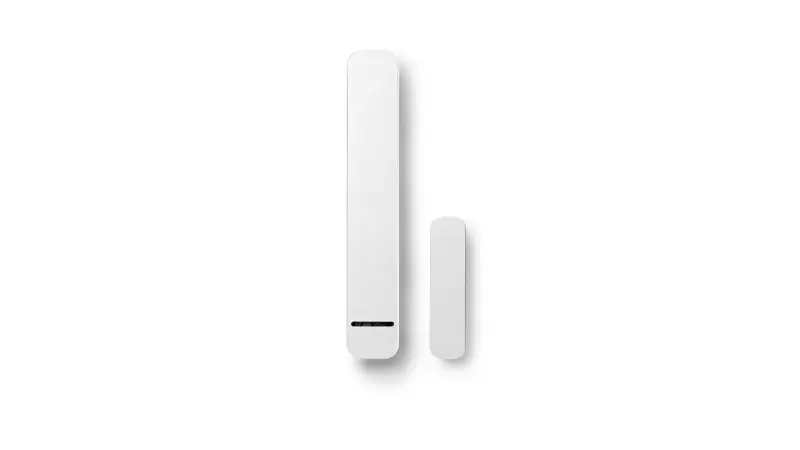
Questions about your Door/Window Contact?
Questions about your Door/Window Contact? You can find installation videos, instructions and answers to frequently asked questions here.
Videos
Helpful videos for your device. You can find more helpful videos on our YouTube channel under the following link: @BoschSmartHome
Door/Window Contact - Installation
Door/Window Contact - Installation
The Bosch Smart Home Door/Window Contact can be installed in just a few simple steps. All you need is the Bosch Smart Home App and the accessories included in the package. After starting the Bosch Smart Home App, it will guide you through the individual installation steps.
Please also refer to our installation video in this article. If you experience any problems displaying the video, you can also find our installation and reset videos on our Bosch Smart Home YouTube Channel at the following link.
Please also refer to the operating/installation instructions at the following link.
If the door/window contact cannot be paired, please go through the following steps:
1. Perform the installation again. Please check whether the device has already been detected. You can check this in the "Devices" menu item. If necessary, remove the device manually from the device list.
2. Please check whether the batteries are inserted correctly. If the batteries are inserted correctly, the LED on the front briefly lights up.
3. Reset the device before a new installation. To do this, open the battery cover and press the button located on the underside while reinserting the batteries until the LED of the door/window contact flashes orange. Release briefly and press the button again until the LED lights up green. Then follow the pairing instructions again.
4. If necessary, briefly disconnect the Smart Home Controller from the power supply and try again. Also make sure that the device is at least 1 meter away from the controller during the learning process.
Please also refer to our reset video in this article. If you experience problems displaying the video, you can also find our installation and reset videos on our Bosch Smart Home YouTube Channel at the following link.
If you continue to have questions or problems with pairing, accessibility or use of the device, please feel free to contact our customer support .
Saving energy made easy: The wirelessly controlled Door/window contact detects open windows and doors and reports them directly to your smartphone via the Bosch Smart Home App.
Need some fresh air? When you ventilate after cooking or drying laundry, you no longer need to remember to turn down your heating. The Door/window contact is linked to the radiator thermostat and thinks ahead for you. It communicates open windows and doors to the radiator thermostat via your Bosch Smart Home Controller. The thermostat can then reduce the heating temperature to a value you have set. This way, you optimize your heating costs with energy-efficient ventilation – completely automatically!
Likewise, our Bosch Smart Home Door/window contact can be part of your security system, whereby uninvited guests can be detected and - in combination with our light and alarm components - scared away.
More about the Bosch Smart Home Door/window contact can be found on theProduct page in our Bosch Smart Home Webshop.
Installation on a window sash is generally possible. During installation, care must be taken to ensure that the contacts are close enough to each other. This can be checked by holding the contacts at the desired location until the LED briefly lights up yellow (batteries must be inserted).
Door/Window Contact - Operations
Door/Window Contact - Operations
Please check whether the LED of the door/window contact still flashes when opening and closing. If this is the case, it is possible that the distance between the Smart Home Controller and the device is too great, or that other products have a disruptive influence on the connection. Also ensure that the component is at least 1m away from the controller during the test.
If you continue to have questions or problems with the integration, reachability or use of the device, you can contact ourCustomer support.
Wait a few seconds after opening the door/window contact. If there is still no change visible, this can have various causes:
1. Check whether the door/window contact indicates opening and closing via the built-in LED. If not, please check the batteries. Check whether the correct door/window contact is visible on your home screen (favorites).
2. The components of the door/window contact may be a maximum of 8 mm apart and must be mounted at the same height (lower edge). Please check the correct alignment.
3. Please check whether at least two or three LEDs are continuously lit on your Smart Home Controller, depending on whether you have activated remote access.
4. It is possible that a door/window contact has been deactivated in the "Ventilation detection" service (menu item "Services") and is therefore not being considered. Please check this setting.
If you continue to have questions or problems with the integration, accessibility or use of the device, you are welcome to contact ourCustomer support.
You can define individual notifications using automations. If a window is open for an extended period of time, for example, an automation can be defined to perform an action (e.g., sending a message to your device or visual notification through a smart lamp, etc.)
You will receive a notification if a window is open. You can activate this option underAdditionally, you can define individual notifications using automations. For example, if a window is open for an extended period of time, an automation can be defined to perform an action (e.g., sending a message to your device or visual notification through a smart lamp, etc.)
Yes. To avoid security gaps, the alarm system actively checks the status of all integrated devices when arming that serve as triggers for intrusion detection in the currently activated alarm profile (door/window contacts and motion detectors). If a window is still open, you will be warned via push notification on your smartphone. To receive the warning, push notifications must be enabled for your alarm system.
To do this, go to.
Door/Window Contact - General Information
Door/Window Contact - General Information
You can find the exact scope of delivery of the Bosch Smart Home door/window contact on the corresponding product page of our webshop. Please follow this link.
Replacement of the first generation Bosch Smart Home door/window contact
Problem:
Your first generation Bosch Smart Home door/window contact is defective and no longer works.
Solution:
In the event of a defect covered by warranty or guarantee, you will receive a replacement. Instead of the original model, you will be sent the Bosch Smart Home Door/window contact II Design in white (model number: 8-750-002-090).
Important information:
- Defective model: Bosch Smart Home door/window contact
- Replacement model: Bosch Smart Home Door/window contact II Design (8-750-002-090)
- Color of replacement model: White
We hope this solution helps you!
Find all information about your door/window contact in the corresponding user manual.
Get in touch with us.
A personal and professional service is important to us. If you have any questions or need professional personal support, please do not hesitate to contact us.