Light/shutter control II help
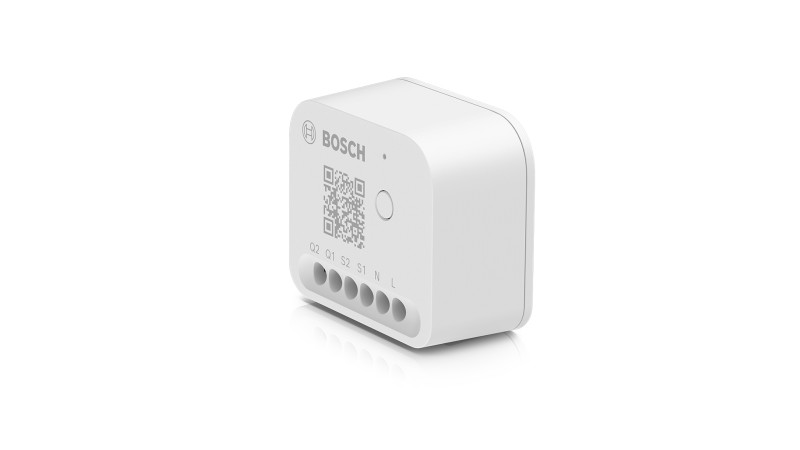
Questions about your Light/shutter control II?
Questions about your Light/shutter control II? You can find installation videos, instructions and answers to frequently asked questions here.
Light/shutter control II - Installation
Light/shutter control II - Installation
Changing the switch type in the Bosch Smart Home App
Did you swap the rocker switch with the push button during installation? No worries, this can be easily corrected. You can change the switch type at any time in your Bosch Smart Home App. Here's how you can do it:
1. Open the Bosch Smart Home App on your device.
2. Go to device management.
3. Here you have the option to change the switch type.
So it's not a problem if you made a mistake during installation. With the Bosch Smart Home App, you can adjust the settings easily and conveniently.
Bosch Smart Home Light/Shutter Control II: Installation Instructions
To optimally install the Bosch Smart Home Light/Shutter Control II, it is important to observe the correct depth of the flush-mounted box:
Minimum depth:The flush-mounted box behind your switch should be at least 50mm deep.
Recommended depth:For optimal installation, however, we recommend a box with a depth of at least 60mm.
With these specifications, you can ensure that your Bosch Smart Home Light/Shutter Control II fits perfectly and functions properly.
Using the Bosch Smart Home Light/shutter control II in an economy two-way switch circuit
The economy two-way switch is a special type of circuit. If you want to combine it with the Bosch Smart Home Light/shutter control II, there are some points to consider:
Installation location:
Unlike the conventional two-way switch, the Bosch Smart Home Light/shutter control II should not be installed behind the switch, but directly in front of the load you want to control.
Switched phase:
The economy two-way switch has only one switched phase. This means it has only one path for current flow.
It may be necessary to install an additional cable. To be sure, we recommend consulting an electrician. The correct installation and use of the Bosch Smart Home Light/shutter control II is important to be able to optimally use all of its functions.
Troubleshooting: Bosch Smart Home Light/shutter control II does not detect the end position
Are you experiencing difficulties because your Bosch Smart Home Light/shutter control II does not automatically detect the end position of the shutter? Then please follow these steps:
1. Open the Bosch Smart Home App on your smartphone or tablet.
2. Find the affected device in the device settings of the app.
3. Disable the "automatic end position detection" option.
4. Perform the calibration manually.
These steps should resolve the issue. If you continue to experience difficulties, do not hesitate to contact us.
Changing the button assignment on the Bosch Smart Home Light/Shutter Control II
Yes, you can change the button assignment of your Bosch Smart Home Light/Shutter Control II. This is possible both during the installation process and after installation. After successful installation, the button assignment can be changed in the device management of the Bosch Smart Home Light/Shutter Control II.
Notes on installing the Bosch Smart Home Light/shutter control II
Before you begin installing the Bosch Smart Home Light/shutter control II, there are a few things you should consider:
Space requirements:
Make sure that the location where you want to install the device has enough space.
Box depth:
The box depth should be at least 50mm, ideally 60mm.
Power supply:
The installation requires a power supply of 230 volts AC. Both a phase and a neutral conductor must be present.
For more detailed information, please refer to theOperating instructionsof the Bosch Smart Home Light/shutter control II.
Installation video:
We have also prepared a helpful installation video for you. If you have problems displaying the video, you can find this and other helpful videos on ourBosch Smart Home Youtube Channel.
We hope this information is helpful and wish you success with the installation!
Problem: No response from S1 and S2 during installation of the Bosch Smart Home Light/shutter control II
If you find that the inputs S1 and S2 of your Bosch Smart Home Light/shutter control II are not responding during installation, the problem may be that the control has not yet been properly configured in the Bosch Smart Home App.
Solution:
The inputs S1 and S2 only execute switching commands once the Light/shutter control II has been correctly set up in the Bosch Smart Home App as a light control or shutter control. Therefore, please follow these steps:
1. Open the Bosch Smart Home App.
2. Configure the Light/shutter control II as a light control or shutter control.
After you have completed these steps, the inputs S1 and S2 should function as expected.
Later setup of the Light/shutter control II
No worries if you do not yet have internet or power access in your new building. You can also set up your Light/shutter control II at a later time. Here are the steps you need to follow:
1. Activate teach-in mode:As soon as you are ready, press the system button on the Light/shutter control II to activate the teach-in mode.
2.Using a push button/switch:If you have already installed a push button or switch, you can also easily activate the teach-in mode by pressing any button on this device.
Problem: Lack of space in the device box
We will soon provide an accessory that will enable you to install the Light/shutter control II in the existing flush-mounted box in a space-saving manner.
The accessory can also be combined with rockers and frames from a large number of switch series from well-known brand manufacturers.
Light/shutter control II - Operation
Light/shutter control II - Operation
Resetting the Bosch Smart Home Light/shutter control II to factory settings
Here are the steps to reset your Bosch Smart Home Light/shutter control II to factory settings:
Method 1: Via the system button
1. Press and hold the system button for about 4 seconds until the status LED flashes orange rapidly.
2. Release the system button briefly and press it again until the LED lights up green briefly.
3. The device will now restart.
Note:Don't forget to delete the device in the Bosch Smart Home App. You can find it under "More" >> "Devices".
Method 2: When installed with a connected switch:
1. Press the switch 12 times within a maximum of 10 seconds.
2. The device will restart.
Method 3: When installed with a connected push button:
1. Press the push button 6 times within a maximum of 10 seconds.
2. The device will restart.
Note: For methods 2 and 3, you must also delete the device in the Bosch Smart Home App before you can pair it again.
We hope this guide is helpful for you. If you have any further questions, we are happy to assist you!
Improving the range of the Bosch Smart Home Light/shutter control II
If you are experiencing problems with the range of your Bosch Smart Home Light/shutter control II, there are two simple solutions:
1.Move the Light/shutter control II closer to the controller:Try to place the Light/shutter control II closer to the Bosch Smart Home controller. This could improve the connection.
2.Use of a compact plug-in switch:A Bosch Smart Home compact plug-in switch can serve as a range extender. Simply place it halfway between the controller and the Light/shutter control II.
With these tips, the range of your Bosch Smart Home Light/shutter control II should be improved.
Maximum number of lamps with the Bosch Smart Home Light/shutter control II
With the Bosch Smart Home Light/shutter control II, you can control a variety of lamps. The exact number depends on the total power of the lamps. Here are the most important points you should consider:
Maximum switching capacity:The control can manage lamps up to a maximum resistive load of 500W. This means you can connect as many lamps as you want, as long as the total power does not exceed 500W.
Two channels:The control offers you the ability to control two separate light sources (or channels). This means you can connect multiple lamps to each channel and control them independently.
Please remember that the installation should be carried out by a professional to ensure that everything is connected safely and correctly.
We hope this information is helpful to you. If you have any further questions, we are happy to assist you.
Bosch Smart Home Light/shutter control II: Slat control
Yes, you can control your slats with the Bosch Smart Home Light/shutter control II.
With the Shutter control II, you can precisely adjust the position of your slats. You can fully open, close, or position them to let the perfect amount of light into your room.
What does the orange flashing of the status LED on the Bosch Smart Home Light/Shutter Control II mean?
If the status LED of your Bosch Smart Home Light/Shutter Control II is flashing orange, this can mean two things:
1. Pairing mode is active: The device is ready to be connected to other devices in your Bosch Smart Home system.
2. The device is communicating with the Bosch Smart Home Controller: This indicates that data is being exchanged between the device and the controller.
Please note that both states are normal and part of the functions of your Smart Home system.
What does the green flashing of the status LED on the Bosch Smart Home Light/shutter control II mean?
If the status LED of your Bosch Smart Home Light/shutter control II is flashing green, that's good news! It means that the pairing mode or another process has been successfully completed.
What does it mean when the status LED of the Bosch Smart Home Light/shutter control II flashes red?
If the status LED of your Bosch Smart Home Light/shutter control II flashes red, this indicates that the pairing mode was not successful or the process has failed.
This could have various reasons, such as:
- Connection issues
- Range issues
- Errors during installation or mounting
Please check these points and try again. If you continue to experience problems, please contact ourCustomer Service.
What does the red flashing of the status LED on the Bosch Smart Home Light/Shutter Control II mean?
If the status LED of your Bosch Smart Home Light/Shutter Control II flashes red six times long, this indicates that the device is unfortunately defective.
In this case, please contact our service viaContact form. Please include the proof of purchase and describe the problem as precisely as possible.
Bosch Smart Home Light/shutter control II: Maximum Load
The maximum load that may be applied to the Bosch Smart Home Light/shutter control II is400 watts. Please ensure that you do not exceed this limit to guarantee optimal performance and safety.
Please also note the installation and prerequisite requirements for the installation and use of this device. If you have any further questions, we are happy to assist you.
Bosch Smart Home Light/shutter control II: Maximum inductive load
You are using the Bosch Smart Home Light/shutter control II as a light control? Here is the most important information you need to know about the maximum inductive load:
- The maximum inductive load you can connect to the control is 2 x 200 watts.
Please ensure that you do not exceed this limit to guarantee optimal performance and safety.
Bosch Smart Home Light/shutter control II: Maximum resistive load
If you want to use the Bosch Smart Home Light/shutter control II, there is a specific limit for the resistive load that must be observed:
- The maximum resistive load allowed is 2 x 500 watts.
Please ensure that you do not exceed this limit to guarantee safe and efficient use of your Light/shutter control II.
Bosch Smart Home Light/shutter control II in case of fire
The Bosch Smart Home Light/shutter control II offers helpful functions in case of fire. It works hand in hand with the Bosch Smart Home smoke detector or Twinguard. As soon as they detect a fire, the Light/shutter control II reacts in the following way:
Light control:If you use the device as a light control, it automatically switches on the corresponding lamps. This creates an illuminated escape route for you.
Shutter control: If you use the device as a shutter control, it automatically opens the corresponding shutters. This allows you an unobstructed escape route.
With these functions, the Bosch Smart Home Light/shutter control II helps to increase your safety in case of fire.
Troubleshooting: Bosch Smart Home Light/shutter control II not reachable
If your Bosch Smart Home Light/shutter control II cannot be reached in the Smart Home app, you can perform the following troubleshooting steps:
1.Check manual control:Try to operate the Light/shutter control II manually. If that works, the problem is probably not with the control itself.
2.Restart the controller:Disconnect the controller from power and reconnect it to perform a restart.
3.Check range:Make sure that the control is within range of your Smart Home controller II.
4.Range extension:In case of connection problems, a Bosch Smart Home compact plug-in switch can help extend the range.
5.Reset and re-pair:If the problem persists, reset the flush-mounted switch to factory settings and re-pair the device with your system.
If you continue to experience difficulties, please contact either the Bosch Smart HomeCommunityor ourService team.
Instructions for tilting slats with the Bosch Smart Home App
If you are using the Bosch Smart Home Light/shutter control II to control your slats, you can easily tilt them via the Bosch Smart Home App. Here is how you can do it:
1. Open the Bosch Smart Home App on your device.
2. Select the shutter control that you have defined.
3. Depending on the tilt angle of your slats (90° or 180°), you have the option to tilt the slats accordingly.
With these simple instructions, you can adjust the position of your slats anytime and anywhere. Enjoy the control over your home with the Bosch Smart Home App!
Troubleshooting: Bosch Smart Home Light/shutter control II does not respond
If your Bosch Smart Home Light/shutter control II does not respond to the switch or button, the problem could be with the child lock. This function may have been activated during initial setup and is now preventing operation of the device:
1. Open the device management.
2. Look for the child lock setting.
3. Disable the child lock.
After completing these steps, your Light/shutter control should function normally again. If the problem persists, please contactCustomer Service.
Light/shutter control II - General
Light/shutter control II - General
Size and installation of the Bosch Smart Home Light/shutter control II
The Bosch Smart Home Light/shutter control II is compact and measures 40.5 x 47 x 22mm. Before proceeding with the purchase, please ensure that you have sufficient space for installation.
Requirements for installation:
- We recommend a mounting box depth of at least 60mm.
- The installation should ideally be carried out by a qualified electrician to ensure that everything is installed correctly and safely.
Please note these points to ensure a smooth installation and optimal use of your Bosch Smart Home Light/shutter control II.
Child lock on the Bosch Smart Home Light/shutter control II
Yes, the Bosch Smart Home Light/shutter control II has a child lock. This function allows you to restrict control of the device to the Bosch Smart Home App. Here are the steps to activate the child lock:
1. Open the Bosch Smart Home App.
2. Go to device management.
3. Activate the child lock.
Once activated, the Light/shutter control II can only be operated via the app. However, there is one important exception: In the event of a fire, the shutters automatically move up for safety reasons.
Bosch Smart Home Light/shutter control II: No adapters required
You do not need any additional adapters for the Bosch Smart Home Light/shutter control II.
We hope this information is helpful to you. If you have any further questions, please do not hesitate to contact us.
Bosch Smart Home Light/shutter control II: Compatibility with push buttons
Yes, the Bosch Smart Home Light/shutter control II is compatible with push buttons. Here are some important points to note:
During installation:You have the option to choose between control with switches and push buttons. So it is completely tailored to your personal preferences and needs.
Easy operation:Use with push buttons is seamless and intuitive, allowing you convenient and efficient control of your lights and shutters.
Please don't forget that you can always refer to the Bosch Smart Home user manual or customer service if you have any further questions or concerns.
Bosch Smart Home Light/shutter control II: Functions
The Bosch Smart Home Light/shutter control II is a versatile device that helps you make your home more comfortable. Here are the main functions:
Control of shutters, awnings, and blinds:With this device, you can conveniently control your shutters, awnings, and blinds.
Light control:You can switch one or two lights or other devices on and off independently.
Power measurement:The device also measures the power consumption of connected devices. This allows you to better monitor and control your energy usage.
With the Bosch Smart Home Light/shutter control II, you have more control and comfort in your home.
Bosch Smart Home Light/shutter control II and latching relay
The Bosch Smart Home Light/shutter control II is compatible with a latching relay. You can use these two devices together without any problems.
Please note that it is always important to check the specific requirements and prerequisites of your devices to ensure that they function correctly.
We hope that this information is helpful for you. If you have any further questions, we are happy to assist you.
Energy consumption measurement with the Bosch Smart Home Light/shutter control II
Yes, the Bosch Smart Home Light/shutter control II offers a function for measuring energy consumption. When you use this device as a light control, you can view the energy consumption in the Bosch Smart Home App.
The Smart Home App shows you:
- The current power consumption in watts
- The total consumption over a specific period in watt-hours
This function allows you to monitor and manage the energy consumption of your lighting.
Yes, you can set a time control for the Bosch Smart Home Light/shutter control II. Here is how it works:
- If you use the device as a light control: You can set a time control, similar to the Bosch Smart Home radiator thermostats, room thermostats, plug adapters and other light controls.
- If you use the device as a shutter control: You can set an individual time control in the Bosch Smart Home App. Use the "Automations" function for this purpose.
This way you have full control over your Light/shutter control II according to your needs and schedule.
The Bosch Smart Home App displays the total energy consumption, not separately for each light. This means that the consumption of all connected bulbs is combined and displayed as one total number.
Integration of the Bosch Smart Home Light/shutter control II into Smart Home Systems
Yes, you can connect your Bosch Smart Home Light/shutter control II with Apple HomeKit, Amazon Alexa and Google Home. This allows you to extend the functions of your control and operate it conveniently via voice command.
Requirements for integration
To connect your Bosch Smart Home Light/shutter control II with these systems, you need:
- The Bosch Smart Home Controller
- The Bosch Smart Home App for iOS and Android devices
With these two components, you can easily integrate your Light/shutter control II into your preferred Smart Home system.
Functions of the Bosch Smart Home Light/shutter control II
The Bosch Smart Home Light/shutter control II is a versatile device that helps you control your shutters, blinds and awnings. Here are some of the main functions:
-Automation:You can set schedules for opening and closing your shutters, blinds and awnings. For example, you can ensure that your shutters go up at the same time every morning.
- Remote control: With the Bosch Smart Home app, you can control your shutters, blinds and awnings from anywhere. This is particularly convenient when you are not at home and want to close or open the shutters.
Installation
The installation of the Bosch Smart Home Light/shutter control II is simple and straightforward. You only need a flush-mounted box near the shutter, blind or awning to be controlled. The device is then attached to the wall using the mounting material provided.
Requirements
To use the Bosch Smart Home Light/shutter control II, you need the following:
- A stable internet connection
- A smartphone or tablet with the Bosch Smart Home app
- A flush-mounted box near the shutter, blind or awning to be controlled
With these requirements, you can enjoy full control over your shutters, blinds and awnings and make your home even more comfortable.
Yes, the Bosch Smart Home Light/shutter control II can be integrated into the presence simulation. Here are the most important points you should know:
Light control II: If you use the Bosch Smart Home Light/shutter control II as a light control, it is part of the presence simulation.
Shutter control II: If you use it as a shutter control, you have the option to set individual times for opening and closing the shutters. This is done through the "Automation" function.
Please note that these settings help you make your home more secure by simulating the presence of people, even when no one is at home.
Bosch Smart Home Light/shutter control II: Radio protocol and functions
The Bosch Smart Home Light/shutter control II uses the ZigBee 3.0 radio protocol. This protocol is not only responsible for communication between the controller and your devices, but also has another important function:
Range extension: The Light/shutter control II can serve as a range extender for other Bosch Smart Home devices that also use ZigBee 3.0. This way, you can ensure that all your devices are always connected to each other, regardless of how far apart they are.
Please note that the exact range may depend on various factors, including the number and type of devices you have in your smart home system.
Bosch Smart Home Light/shutter control II: Outdoor use
You would like to use the Bosch Smart Home Light/shutter control II outdoors? There are a few things you should consider:
Protective enclosure:To ensure that your Light/shutter control II is protected from the elements, it must be installed in a protective enclosure with protection class IP66. This enclosure protects the control from dust and powerful water jets.
Please remember that correct installation and protection of your devices are important to ensure their longevity and optimal performance.
Bosch Smart Home Light/shutter control II: No switch replacement necessary
No replacement of the existing switch is required to use the Bosch Smart Home Light/shutter control II. Unlike the first generation of light and shutter control, the current version is simply installed between the existing switch and the circuit.
Advantages:
- No replacement of the existing switch necessary
- Simple installation between switch and circuit
This allows you to put your Bosch Smart Home solution into operation even more easily and conveniently.
Get in touch with us.
A personal and professional service is important to us. If you have any questions or need professional personal support, please do not hesitate to contact us.