Motion Detector help
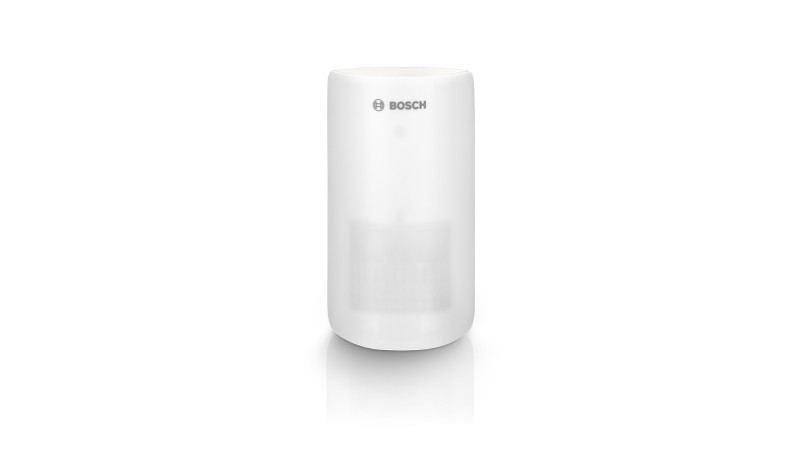
Questions about your Motion Detector?
Questions about your Motion Detector? You can find installation videos, instructions and answers to frequently asked questions here.
Videos
Helpful videos for your device. You can find more helpful videos on our YouTube channel under the following link: @BoschSmartHome
Motion Detector - Installation
Motion Detector - Installation
Mount your Smart Home motion detector optimally at a height of 2.20 m to 2.70 m – in a location where passage is likely. Make sure that there are no fans, radiators, or windows in the monitoring area.
You can mount the Bosch Smart Home motion detector on both a wall and in a corner. Depending on the surface, this can be done with screw or adhesive mounting.
Placing it on a shelf is not recommended. If you do, the motion detector should also be at a height of 2.20m-2.70m.
Please also follow the detailed instructions during the installation process in the app as well as the information in theInstallation instructions.
Make sure that the motion detector is within range of your Smart Home Controller. During installation, you can check the connection quality at your desired mounting location in the app.
If problems with integration persist, please carry out the following steps if necessary:
1. Check in the app settings whether the version is up to date. If not: Please update the version to the latest status.
2. Carry out the installation again. To do this, please check whether the device is available under the menu item "Devices" and remove it if necessary.
3. Perform a reset before reinstalling. To do this, press and hold the mode button of the motion detector when reinserting the battery compartment until the LED of the motion detector flashes orange. Release briefly and press the button again until the LED lights up green. Then wait briefly and follow the connection instructions again.
4. Please check whether the batteries are inserted correctly.
Please also refer to our reset video in this article. If you experience problems displaying the video, you can also find our installation and reset videos on our Bosch Smart Home YouTube Channel at the followingLink.
You can mount the Bosch Smart Home motion detector on a wall or in a corner. Depending on the surface, this can be done using screw or adhesive mounting.
Placing it on a shelf is not recommended. If you do so, the motion detector should still be positioned at a height of 2.20m-2.70m.
Please also refer to our installation video in this article and the correspondinginstallation guide.If you experience problems displaying the video, you can also find our installation and reset videos on our Bosch Smart Home YouTube Channel at the followinglink.
Please also follow the detailed instructions during the installation process in the app as well as the information in theinstallation guide.
To perform a reset on your device, please proceed as follows:
1. First, remove the battery compartment.
2. When reinserting the battery compartment, press and hold the contact switch ("Mode" button) on the inside of the device.
3. As soon as the LED flashes orange rapidly, release the button briefly.
4. Now press the "Mode" button again until the LED lights up green briefly.
The device will then restart. Please note that it may take a few seconds for the motion detector to be ready for operation again.
Please also refer to our reset video in this article. If you experience problems displaying the video, you can also find our installation and reset videos on our Bosch Smart Home YouTube Channel at the followingLink.
The Bosch Smart Home motion detector can be installed in just a few simple steps. All you need is the Bosch Smart Home app, the accessories included in the package, and possibly a drill and screwdriver. After starting the Bosch Smart Home app, it will guide you through the individual installation steps.
Please also refer to our installation video in this article. If you experience any problems displaying the video, you can also find our installation and reset videos on our Bosch Smart Home YouTube channel at the followingLink.
Please also refer to the operating/installation instructions at the followingLink.
Only the included adhesive tape is suitable for mounting and installing the motion detector. In principle, other adhesive tapes are also possible. However, we cannot assume any guarantee/warranty for these.
Please check whether the checkbox for "Light connected" is set for the corresponding device under "Management" >> "Devices" >> "Intermediate socket".
This setting causes the intermediate socket to be treated like a light and integrated into the "Motion light" and "Presence simulation" services. Additionally, you can control the intermediate socket under your "Favorites" via the "Room light" tile together with other lights in the room.
In normal operation, one battery provides a battery life of approximately 5 years. To extend this, you can optionally insert an additional battery.
Even if it doesn't seem like it at first glance, the material at the breakthrough points is designed to be pierced through with minimal force. Don't worry, you can't break anything here.
The built-in spirit level allows you to ensure, especially during screw mounting, that the Motion detector is always correctly aligned and hangs straight on the wall.
Motion Detector - Operations
Motion Detector - Operations
You only need to test the motion detector once during installation. As soon as a malfunction occurs (e.g. batteries running low), you will receive a notification on your smartphone.
The anti-theft protection is a part of the motion detector that remains on the wall/corner when the device is forcibly removed and sends a signal to the controller and thus also to the connected smartphones. This only works reliably with screw mounting.
The Bosch Smart Home Motion detector uses passive infrared technology. All objects (people, animals, vehicles, trees, etc.) emit infrared heat radiation. The Motion detector measures and compares the infrared radiation in its detection range, but does not emit any radiation itself and is therefore passive.
The Bosch Smart Home Motion detector uses passive infrared technology. All bodies (people, animals, vehicles, trees, etc.) emit infrared heat rays. The Motion detector measures and compares the infrared radiation in its detection range, but does not emit any rays itself and is therefore passive.
You can choose between pet detection and crawl-under protection on your Smart Home Motion detector. With the preset pet detection, pets up to 25 kg are not detected and crawl-under protection is deactivated. Activating crawl-under protection ensures that movements directly under your Motion detector do not go undetected.
You can configure the corresponding setting under the following menu path: Administration >> Devices >> Motion detector >> Your corresponding Motion detector >> Additional functions >> Set sensitivity.
The motion detector now switches on all Philips Hue lamps in the same room when motion is detected.
For this purpose, the light sensitivity of the motion detector can be individually adjusted. After the corresponding darkness occurs, the light sensor in combination with a detected movement of the motion sensor triggers the function.
The light can be switched off at time intervals. You have the option to set different time intervals here. In addition, the brightness (1 to 100%) of the Philips Hue lamps can be adjusted.
To do this, you must have either a Philips Hue lamp or the "Flush-mounted light control" component for the corresponding lamp to be switched.
It should also be noted that the light is switched off depending on time. After a minimum of 5 minutes (selectable up to approx. 60 minutes) or optionally via the wall switch (flush-mounted control / universal switch / universal switch Flex).
Starting from the motion detector, 90° to the sides and 12 m in depth.
Depending on whether the crawl-under protection is active, movements below the motion detector are also checked within the specified angle.
If the motion detector is shown as unreachable in the app, it is possible that the distance between the Smart Home Controller and the component is too great, or that other products have a disruptive influence on the connection. Also ensure that the component is installed at least 1 meter away from the Smart Home Controller, so it is not too close to the Smart Home Controller.
Make sure there are no problematic objects within range of your motion detector (for example, a fan or radiator). If you have pets, also activate the pet detection feature. You can find a detailed overview in the installation instructions.
Please also refer to our installation video in this article. If you experience problems displaying the video, you can also find our installation and reset videos on our Bosch Smart Home YouTube Channel at the following link.
After a detected motion, no further motion is detected for 180 seconds.
The Motion detector sends a signal to your Smart Home Controller. Here, for example, the following actions can be triggered via the "Alarm System" service:
- You will receive a notification on your mobile phone.
- The siren of the Smoke alarm sounds.
- Connected Philips Hue lamps flash red.
This can have a deterrent effect.
Furthermore, the Motion detector can serve as a trigger for scenarios and automations. It can also be integrated into the "Motion Light" service and start any actions there.
To check the function of your motion detector, please open your Smart Home App. In the device management, please select the corresponding motion detector and click on "Test motion detector".
If the test is negative, please note the instructions in the app as well as in the operating / installation manual under the following Link.
Motion Detector - General Information
Motion Detector - General Information
You can find the exact system requirements and the exact scope of delivery of the Bosch Smart Home Motion detector on the corresponding product page of our webshop. Please follow this link.
The intelligent Motion detector from Bosch Smart Home reliably and precisely detects movement. It distinguishes between conspicuous and inconspicuous events. This way, it only triggers an alarm when necessary.
The Bosch Smart Home Motion detector is a Smart Home component that detects and reports movements indoors with the help of a passive infrared sensor (PIR).
There's activity at your home – of course, after all, you and your loved ones lead an active life! When you leave the house, nothing stirs there anymore – except perhaps your cat, comfortably strolling through the hallway. As part of your Smart Home system, the intelligent Motion detector distinguishes a break-in from your kitty's domestic walk. In case of unwanted movements, it reacts in two ways: It immediately sends you a notification via app through the system. At the same time, it triggers the siren of the smoke alarm.
This way, you are informed while on the go and uninvited guests are deterred on site. Accordingly, you can be sure at all times that your home – including your cat – is well protected.
You can find more information on the corresponding product page of our webshop. Please follow thisLink.
Every living being emits thermal radiation in the infrared range. For small animals, this is correspondingly less than for humans. Essentially, the threshold for the heat sensor is raised for small animal detection.
To set the appropriate sensitivity, please go to the additional functions of your motion detector and follow the instructions in the "Sensitivity setting" section.
You can find all standards in the declarations of conformity on our homepage atLink.
Get in touch with us.
A personal and professional service is important to us. If you have any questions or need professional personal support, please do not hesitate to contact us.