Radiator Thermostat help
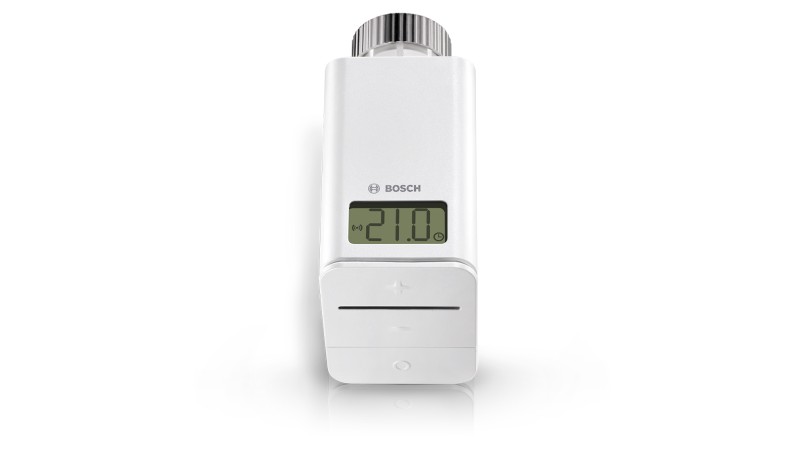
Questions about your Radiator thermostat?
You can find installation videos, instructions and answers to frequently asked questions here.
Videos
Helpful videos for your device. You can find more helpful videos on our YouTube channel under the following link: @BoschSmartHome
Radiator Thermostat - Installation
Radiator Thermostat - Installation
If your Bosch Smart Home Radiator thermostat does not fit your heating system, there are the following solutions:
Use an adapter
The Bosch Smart Home Radiator thermostat comes with several adapters. Try using one of these adapters. If none fit, you can purchase additional adapters from retailers.
Install the adapter
Insert the appropriate adapter completely onto the valve. You should hear a click when the adapter is properly seated.
Contact customer service
If you are unsure, you can take photos of your radiator valve from different angles and send them to our customer service. Use our contact form.
If your Bosch Smart Home radiator thermostat displays the error message "Valve stroke too long", this may indicate a problem with the installation or assembly. Here are some steps you can take to troubleshoot:
Check the assembly
Make sure that the thermostat is correctly mounted on the radiator valve. It should be firmly seated and not wobble or turn easily.
Check the valve stroke
The valve stroke is the distance that the valve opens and closes. If this is too long, the thermostat may not be able to control the valve properly. You can try to shorten the valve stroke by mounting the thermostat closer to the valve.
Reset the thermostat
If the above steps do not resolve the problem, you can try resetting the thermostat and reinstalling it.
If you continue to have problems or are unsure how to proceed, please do not hesitate to contact our customer support. We are here to help you!
Removing your old thermostat from the radiator is a simple process that can be performed in various ways depending on the model. Here are the most common methods:
Screw connection
With this method, you can simply unscrew the thermostat.
Clip connection
Here, the thermostat must be unclipped from the side.
Allen key connection
In this case, you need to remove the thermostat from the side using an Allen key.
Please note that if you are unsure, you should always seek the help of a professional to avoid damage.
Are you having difficulties installing your Bosch Smart Home Radiator Thermostat? Don't worry, we're here to help! Here are some simple steps you can follow:
Step 1: Check the installation
First, go to the "Devices" menu item and check if the device has already been detected. If so, remove it and try the installation again.
Step 2: Reset the device
If reinstalling doesn't work, try a reset. This works as follows:
- Remove one of the batteries from the battery compartment. Press and hold the Mode button on the thermostat while reinserting the battery.
- Wait until the thermostat's LED flashes orange, then release briefly.
- Press the button again until the LED lights up green.
- Wait a moment and then follow the pairing instructions again.
Step 3: Check the batteries and position
Make sure the batteries are inserted correctly and the LCD display is active. Also ensure that the device is at least 1 m away from the controller during pairing.
Step 4: Disconnect the controller from power
If all other steps don't work, briefly disconnect the Smart Home Controller from power and try again.
For a visual guide, you can watch our reset video on this page or on ourBosch Smart Home Youtube Channel. We hope these steps help you successfully install your thermostat!
If you hear unusual noises during the installation of your Bosch Smart Home radiator thermostat, here are some possible explanations and solutions:
Calibration noises
During the calibration of the radiator thermostat, quiet humming noises may occur. This is normal and part of the installation process.
Loud or creaking noises
If you repeatedly hear loud or creaking noises during operation, the Bosch Smart Home radiator thermostat may be defective or not properly secured. In this case, you should check the mounting of the radiator thermostat again.
Adapter required
Some heating models require an adapter. Make sure to use one if it is required for your model.
Hereto the adapter check.
Please also refer to theOperating/Installation instructionsfor further information and instructions.
Yes, you can display the temperature measured by your Bosch thermostat. Here are the steps you need to follow:
1. Open the Bosch Smart Home Appon your smartphone or tablet.
2. Go to"More"and then to"Devices".
3. Select"Radiator thermostat"and then the specific thermostat whose temperature you want to display.
4. In the"Measured temperature"section, the temperature currently measured by the thermostat is displayed.
Please note the following points:
- The displayed temperature already includes the set temperature adjustment.
- Since the temperature is measured directly at the thermostat, there may be deviations from the actual room temperature. However, you can correct this deviation through an adjustment.
In some cases, such as an error during the initial calibration or if the valve stroke is too long, it may be necessary to recalibrate your Bosch Smart Home radiator thermostat. Here are the steps you need to follow:
1. Briefly press the mode buttonon the thermostat. This should start the calibration process.
Or
2. Remove one of the batteries and reinsert it. This should also start the calibration process automatically.
The calibration may take a few minutes. During this time, the thermostat should not be moved or turned off. After recalibration, the thermostat should function correctly again
Yes, you can connect your Bosch Smart Home radiator thermostat with Apple HomeKit and use convenient voice control via Siri.
To establish the connection, you need the Apple HomeKit app and the Bosch Smart Home app. Follow the instructions in the apps to connect the devices and set up voice control.
Installing your Bosch Smart Home radiator thermostat is a simple process that you can do yourself. Here are the basic steps:
1. Preparation: Make sure your radiator has a standard M30x1.5 valve. This is the most commonly used valve type. If your radiator has a different valve, you will need a suitable adapter. This is often included with the thermostat or can be purchased separately. Hereyou can go to the adapter check.
2. Set up in the app: Open the Bosch Smart Home app, select "More" --> "Devices" --> "Add device" and follow the instructions to connect the radiator thermostat to the Bosch Smart Home Controller.
If the display of your radiator thermostat remains blank and the device does not respond, the batteries may be almost empty. This can cause the temperature control to no longer function as usual.
Follow these steps to resolve the issue:
1. Replace batteries: Replace the batteries as soon as possible. Your thermostat requires two AA batteries, also known as Mignon batteries or LR06.
2. Remove residual voltage:If the display is still blank after replacing the batteries, remove the batteries, press any button for several seconds, and then reinsert the batteries.
After these steps, your radiator thermostat should function as usual again.
Radiator Thermostat - Operations
Radiator Thermostat - Operations
To reset your Bosch Smart Home Thermostat, please follow these steps:
Steps to Reset
1. Remove the batteries from the battery compartment. It is sufficient to remove only one battery.
2. Press and hold the "Mode" button (the lower button with the circle symbol) while reinserting the batteries. The LED will start flashing green/orange, but continue to hold the button.
3. When the LED flashes orange rapidly, briefly release the button and press it again until "rES" disappears from the display and the LED flashes green.
4. The device will now restart. This may take a few seconds.
Additional Resources
For a visual guide, you can watch our reset video on this page or on ourBosch Smart Home Youtube Channel.
The terms "warm phase", "cold phase", and "rapid heating" refer to different functions of the Bosch Smart Home radiator thermostat. Here is what they mean:
Warm phase
This is the temperature you set for your home when you are present.
Cold phase
This is the temperature that should be set when you are not at home.
Rapid heating
This function, symbolized by a "rocket" in the manual control view of the thermostat, greatly increases heat output for a short time to quickly bring the room temperature to the desired level. "HI" appears on the thermostat display.
Setting temperature profiles
With the Bosch Smart Home App, you can set individual temperature profiles for each room. To do this, select the room in the main menu of the app and swipe left to choose between automatic and manual operation. Swipe further left to access the timer, where you can set and save individual heating and setback times for each day.
You can easily set the temperature in your home with the Bosch Smart Home App and your Bosch Smart Home Radiator thermostats or Room thermostats. Here's how it works:
Individual room temperature
1. Open the Bosch Smart Home App and go to the home screen.
2. Select the room for which you want to set the temperature.
3. Adjust the room temperature according to your preferences. You can set both the heating and lowering temperature.
Manual setting
You can also set the heating temperature manually, either in the Bosch Smart Home App or directly on the Bosch Smart Home Radiator thermostat. This manually set temperature remains active until the next switching point.
Time profile
With the Bosch Smart Home App, you can create a time profile. You can set up to 13 switching points per day and define a heating and lowering temperature for each switching point. The Bosch Smart Home Radiator thermostat will then automatically set the stored temperature at the specified times.
Automatic mode
In automatic mode, the Bosch Smart Home Radiator thermostat regulates the temperature based on the preset settings in the Bosch Smart Home App.
Please note that for optimal use of the functions, you should observe theOperating/Installation instructions.
If you have multiple Bosch Smart Home radiator thermostats in one room, you cannot control them individually. But there is a solution:
Division into virtual rooms
With the Bosch Smart Home App, you can divide a real room into multiple virtual rooms. For example, your "Living Room" could be divided into "Living Room Left" and "Living Room Right".
Moving the thermostats
After you have created the virtual rooms, you can move the radiator thermostats into the respective room. This way, you can control the thermostats in the different areas independently of each other.
Room thermostat per virtual room
Please note that you need a Room thermostat for each virtual room to control the radiator thermostats.
If the Bosch Smart Home app displays Fahrenheit instead of degrees Celsius, this is due to your device settings. Here's how you can change it:
For iOS devices (Apple):
The temperature unit is set centrally in the operating system. To change this, please follow these steps:
1. Open Settings on your device.
2. Select "General".
3. Select "Language & Region".
4. Select "Temperature Unit" and set it to degrees Celsius.
For Android devices:
The temperature unit is usually controlled via the system language. A specific setting is generally not possible. If you set the system language to a language that uses degrees Celsius (such as German), the app should also display degrees Celsius.
When the batteries in your Bosch Smart Home radiator thermostat run out, this has certain effects on the device's function:
No motor power
The Bosch Smart Home radiator thermostat requires power to control the valve. Without batteries, it can no longer move the valve.
Emergency position
When the battery voltage drops below 2.1 volts, the Bosch Smart Home radiator thermostat switches to an emergency position. In this position, the valve opens to 15%.
Temperature control
With a valve opening of 15%, the Bosch Smart Home radiator thermostat can no longer maintain a specific temperature. However, this opening should be sufficient to maintain an approximately normal room temperature until the batteries can be replaced.
We recommend checking the batteries regularly and replacing them as needed to ensure that your Bosch Smart Home radiator thermostat always functions optimally.
If your radiator thermostat displays "SFA" on the screen, this means that the device is in internal control mode. This mode can be accidentally activated when the circle button and the minus button on the thermostat are pressed simultaneously for some time. But don't worry, it's easy to exit this mode:
Exiting SFA Mode
To exit SFA mode, simply press the circle button on the thermostat for a few seconds and wait a moment. The device should then return to normal operating mode.
Here are some steps you can take to resolve the issue:
Step 1: Check the window contact
Make sure that the window contact indicates opening and closing via the built-in LED. In addition, the window contact of the affected window must be assigned to the same room as the thermostat.
Step 2: Check the position of the components
The parts of the window contact should be mounted a maximum of 8mm apart and at the same height (lower edge) to function correctly.
Step 3: Check the batteries
Make sure that the batteries are correctly inserted in both the window contact and the thermostat.
Step 4: Check the Smart Home Controller
Depending on whether you have activated remote access, two or three LEDs on your Smart Home Controller should be continuously lit.
The "Ventilation Detection" is a useful feature in your Bosch Smart Home App that helps save energy and extend the battery life of your Bosch Smart Home Radiator Thermostats. Here is what you need to know about it and how you can configure it:
What is Ventilation Detection?
Ventilation Detection recognizes when a window or door is opened and turns down the Bosch Smart Home Radiator Thermostat to save energy. This is particularly useful during shock ventilation or when a door or window is only opened briefly.
How can I configure Ventilation Detection?
1. Open your Bosch Smart Home App and go to "Services".
2. Select "Ventilation Detection".
3. Here you can select which Bosch Smart Home Door/Window Contacts should use Ventilation Detection.
4. You can also set the response time after which the Bosch Smart Home Radiator Thermostat turns down.
With these settings, you can ensure that your Bosch Smart Home Radiator Thermostats only heat when necessary, thus saving energy and battery life.
If your Bosch Smart Home radiator thermostat has no connection and is no longer reachable, there are various steps you can take for troubleshooting:
Manual control
First, try to control the thermostat manually. If that works, the problem could be related to the connection between the thermostat and the Smart Home Controller.
Range
The distance between the Smart Home Controller and the thermostat could be too great. Try bringing the two devices closer together to see if that solves the problem.
Sources of interference
Other electronic products nearby could interfere with the connection. Check if you can move these devices to improve the connection.
Minimum distance
Make sure the thermostat is at least 1 meter away from the Smart Home Controller to avoid interference.
Battery status
Don't forget to check the battery status of your thermostat. An empty battery could also be the reason for the connection problems.
If you have performed these steps and the problem persists, please do not hesitate to use ourContact form!
Yes, you can use your Bosch Smart Home Radiator Thermostat without a Smart Home Controller. However, there are some limitations and requirements you should be aware of:
Limited functionality
Without a Smart Home Controller, you cannot use time programs and smart functions. However, you can set the target temperature directly on the device using the buttons.
No voice assistants
If you want to connect your thermostat to a voice assistant such as Google Assistant, Alexa, or HomeKit, you will need a Smart Home Controller.
Although it is possible to use the thermostat without a controller, we recommend using a controller to take full advantage of all the features and benefits of your Bosch Smart Home Radiator Thermostat. If you have any further questions, we are here to help!
The Bosch Smart Home Radiator thermostat displays the currently set target temperature directly on its display by default. You can therefore activate the display at any time and take a look at the thermostat to see the set temperature.
To display the target temperature (the temperature you have set for the room) on the display, simply open the Bosch Smart Home App and select the desired thermostat. You can then adjust the display according to your preferences.
You can find the user manual for the Bosch Smart Home Radiator thermostat here:
The summer break function on the Bosch Smart Home Thermostat is a useful feature that helps you save energy. You can activate this function via the Climate Manager service in the Bosch Smart Home App. Here is more information about the function:
1. What is the summer break?During the warm months, you can stop the temperature control of your thermostat. This means that the heating does not run unnecessarily and you can save energy.
2. Room selection:You can select which rooms should continue temperature control. This is useful for rooms that need to be heated even in summer, such as the bathroom.
3. Manual activation:If you need the heating in a room, you can activate it manually at any time on the thermostat or centrally in the app.
4. Display:When the summer break is activated, "OFF" is displayed on your thermostat's display.
5. Additional functions:During the summer break, ventilation detection and rapid heating are deactivated. However, the frost protection function, limescale protection and child lock remain active.
To change the settings for your Bosch Smart Home radiator thermostat, please use the Bosch Smart Home App. Here you can, for example, adjust the heating phases. Follow these steps:
1.Open the Bosch Smart Home Appon your smartphone or tablet.
2.Tap on the favorite tileof the desired room temperature control.
3.Click on the gear icon in the upper right cornerand then select the desired radiator thermostat.
4.Make the desired changes. You can, for example, adjust the display duration.
Alternatively, you can also change the settings via the device management in the app. Here you will find an overview of all connected devices and can make individual settings.
Radiator Thermostat - General Information
Radiator Thermostat - General Information
You can find the exact delivery scope of the Bosch Smart Home Radiator thermostat on the corresponding product page of our webshop. Please follow thisLink.
The Bosch Smart Home Radiator thermostat is an intelligent device that helps you achieve and maintain the perfect room temperature. Here are some of its main functions and features:
Individual temperature control
With this thermostat, you can set the temperature individually for each room. It features an illuminated LCD display and a control LED that help you regulate the room temperature.
Precise settings
You can set your preferred temperature with an accuracy of +/- 0.5 °C directly on the thermostat or via the Bosch Smart Home App. An integrated sensor continuously measures the current room temperature and keeps it constant once the desired value is reached.
Time-controlled settings
The thermostat allows multiple time-controlled settings per day. You can set a different rhythm for each day of the week to meet your individual needs.
Easy operation
Whether you want to sleep at 17.5 °C and be greeted by a warm bathroom at 7:00 a.m., the Bosch Smart Home Radiator thermostat makes it possible. Simply set your desired temperature and let the thermostat do the work.
For more information about the Bosch Smart Home Radiator thermostat, please refer to the Operating instructions.
The "Child lock" option in the settings of your Bosch Smart Home Radiator thermostats and Room thermostats provides additional security and control. Here's what it does:
Activating the child lock
When you activate the child lock in the Bosch Smart Home App, it prevents the settings on the Bosch Smart Home Radiator thermostat from being changed manually.
Control only via the Bosch Smart Home App or voice control
With the child lock enabled, changes can only be made via the Bosch Smart Home App or by voice control. This prevents children or other people from accidentally changing the settings.
Please refer to the current operating instructions for the technical specifications of the radiator thermostat at the following link.
The radiation exposure of the Bosch Smart Home Radiator Thermostat is very low. Here are the most important points you should know:
1. Frequency and transmission power:The thermostat communicates with the Smart Home Controller in the frequency range around 868 MHz. The maximum transmission power is 10 mW and is only used for a few milliseconds every few minutes, but for a maximum of 36 seconds within one hour.
2. Energy-optimized operation:Since the thermostat is battery-operated, great emphasis is placed on energy-optimized operation. This results in the lowest possible communication volume between the thermostat and Smart Home Controller.
3. Comparison with other devices:The radiation exposure of the thermostat is significantly lower than that of other radio frequency sources such as WLAN, cordless phones (DECT), or mobile devices.
4. Further information:For further information on radiation exposure, you can visit the German Federal Office for Radiation Protection.
Please note that radiation exposure also depends on the duration and distance from the transmitter. However, the radiation exposure is generally so low that it has no health effects.
Yes, you can connect your Bosch Smart Home radiator thermostat with Amazon Alexa and use convenient voice control. With Alexa, you can, for example, set the temperature in your home without having to pick up your smartphone.
Please note that to set up the connection, you will need the Amazon Alexa app as well as the Bosch Smart Home app, and both devices must be connected to the internet. Follow the instructions in the apps to establish the connection and set up voice control.
If your Bosch Smart Home radiator thermostat is defective or not working properly, we are here to help you. Please contact our customer service. It is best to use our contact form.
Our customer service will help you diagnose the error and can also inform you about the next steps.
Replacement of your defective Bosch Smart Home radiator thermostat
If your first-generation Bosch Smart Home radiator thermostat is defective, you will receive a replacement device under warranty or guarantee.
Replacement device:
You will receive a Bosch Smart Home Radiator thermostat II (model number: 8-750-002-330).
We hope this information is helpful for you!
Get in touch with us.
A personal and professional service is important to us. If you have any questions or need professional personal support, please do not hesitate to contact us.