Smoke Alarm II help
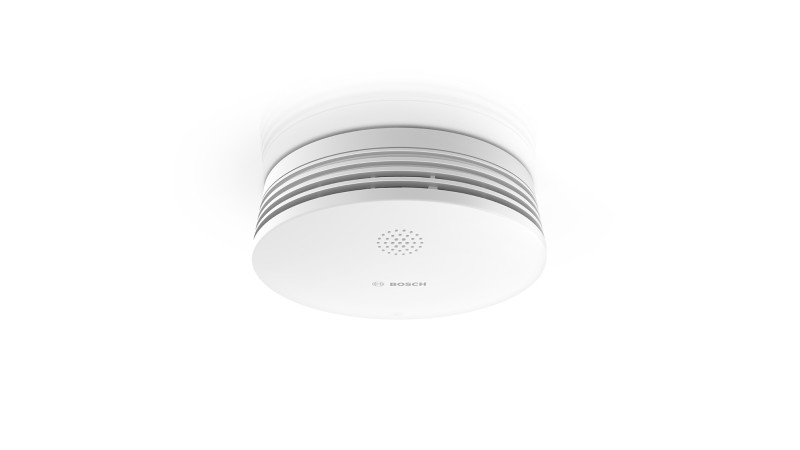
Questions about your Smoke Alarm II?
Questions about your Smoke Alarm II? You can find installation videos, instructions and answers to frequently asked questions here.
Smoke Alarm II - Installation
Smoke Alarm II - Installation
Troubleshooting: Bosch Smart Home Smoke alarm II cannot be paired
If you are having difficulty pairing your Bosch Smart Home Smoke alarm II, you can try the following steps:
1. Restart pairing process:If the Smoke alarm II is not paired within 3 minutes after inserting the batteries, the pairing process will abort. To restart the process, press the button on the smoke alarm three times briefly. The LED should flash briefly and you can continue pairing.
2. Reduce distance to Controller:If pairing still does not work, move the smoke alarm closer to the Bosch Smart Home Controller.
3. Check device settings:Check in the Bosch Smart Home App whether the device is already listed in the device settings.
4. Reset device: If the device is listed in the app, delete it and reset the Smoke alarm II to factory settings.
If you still have problems after these steps, please contact Bosch Customer Service for further assistance.
Location choice for the Bosch Smart Home Smoke alarm II
When installing your Bosch Smart Home Smoke alarm II, there are several points to consider:
1. Data transmission:The ZigBee radio protocol used transmits a lot of data at the beginning of the installation. Therefore, it may not be possible to install the Smoke alarm II at the planned location initially.
2. Proximity to the Controller: For the initial installation, you should bring the Smoke alarm II closer to the Bosch Smart Home Controller.
3. Final location: As soon as you are prompted in the Bosch Smart Home App, you can move the Smoke alarm II to its final location.
4. Signal strength test:Perform a signal strength test at the installation location to ensure that the Smoke alarm II is functioning properly.
Please note that the exact positioning of the smoke alarm may also depend on local fire safety regulations. It is always advisable to check these before installing the smoke alarm.
Mounting the Bosch Smart Home Smoke alarm II on the ceiling
To mount your Bosch Smart Home Smoke alarm II on the ceiling, you have two options:
1. Screws: You can attach the smoke alarm to the ceiling with screws. For this, you will need suitable tools.
2. Double-sided adhesive tape:Alternatively, you can attach the smoke alarm to the ceiling with double-sided adhesive tape. This is a good option if you do not want to or cannot drill into the ceiling.
Please refer to the detailed mounting instructions in theOperating instructionsof your Bosch Smart Home Smoke alarm II to ensure that the smoke alarm is installed correctly and functions properly.
Location of the QR code on the Bosch Smart Home Smoke alarm II
The QR code for your Bosch Smart Home Smoke alarm II is located on the back of the device. To access it, you need to unscrew the mounting plate. Please handle the device with care.
Requirements for adhesive mounting of the Bosch Smart Home Smoke alarm II
To correctly mount the Bosch Smart Home Smoke alarm II, you should consult theOperating instructions. There you will find detailed instructions and requirements for adhesive mounting. It is important to follow these instructions carefully to ensure that the smoke alarm functions properly.
Replacement adhesive tape for the Bosch Smart Home Smoke alarm II
If you have lost the adhesive tape for mounting your Bosch Smart Home Smoke alarm II, you can use 3M™ VHB™ Tape 4955 as a replacement. Please remember to follow the installation instructions in theUser manualto ensure that the smoke alarm is installed correctly.
Smoke Alarm II - Operation
Smoke Alarm II - Operation
Battery type for the Bosch Smart Home Smoke alarm II
Your Bosch Smart Home Smoke alarm II uses a special type of lithium battery, type CR17450.
Please note the following points:
1. Using the correct battery: Make sure you only use the recommended batteries. Using batteries of other types or manufacturers may affect the performance of your smoke alarm.
2. Battery information: You can find information about the required battery in the operating instructions of your device or on the type plate.
3. Battery replacement: If the battery of your smoke alarm is empty, replace it as soon as possible to ensure proper functioning of the device.
Please remember to test the smoke alarm after replacing the battery to ensure it is working correctly.
Replacement of the Bosch Smart Home Smoke alarm II after 10 years
The replacement date on your Bosch Smart Home Smoke alarm II is an important notice. It is based on the DIN 14675-1 standard, which states that smoke alarms, especially those with optical measuring chambers, should be replaced no later than 10 years after commissioning.
This period is recommended to ensure that your smoke alarm always functions properly. Over time, dust and other particles can accumulate in the measuring chamber, which can affect the sensitivity of the detector. Therefore, it is important to replace the smoke alarm after 10 years of operation to ensure your safety. Please remember to plan the replacement in time.
Procedure during a smoke alarm with networked Bosch Smart Home smoke alarms
When a Bosch Smart Home Smoke alarm, Bosch Smart Home Smoke alarm II, or Bosch Smart Home Twinguard triggers a smoke alarm, the signal is transmitted to all other devices in the Bosch Smart Home system. Here is what happens when you press the button on another networked smoke alarm:
1. Muting other devices: If you press the button on a smoke alarm that is sounding the alarm tone but did not trigger the fire alarm, all other smoke alarms, Smoke alarm II, and Twinguards will be muted.
2. Triggering detector remains active:However, the device that triggered the fire alarm remains active and continues to sound the alarm tone.
3. Muting the triggering detector:For safety reasons, the alarm must be muted directly on the triggering detector.
Please note that it is important to act immediately during a smoke alarm and take the necessary safety measures.
Testing your Bosch Smart Home Smoke alarm II
It is important to test the functionality of your Bosch Smart Home Smoke alarm II regularly. Here are some points you should consider:
1. Test methods:You can test the Smoke alarm II either via the app or by pressing the button on the detector itself. When testing via the app, the Smoke alarm plays a predefined tone sequence. If you press the button on the detector, the alarm remains active as long as you hold the button down.
2. Test frequency:You should test the Smoke alarm once a month. A test is also required after every battery change and software update.
3. Testing the intrusion alarm: If you have activated the acoustic alarm, you should also test the intrusion alarm. When the alarm is triggered, all smoke alarms, Smoke alarm II and Twinguards selected in the corresponding alarm profile emit a signal tone.
Please remember that regular tests help ensure the correct function of your Smoke alarm and increase your safety at home.
Bosch Smart Home Smoke alarm II flashes red
If your Bosch Smart Home Smoke alarm II flashes red 5 times every 15 seconds, this indicates a defect. Please contact ourService teamto receive support. We are here to help you and resolve the issue as quickly as possible.
Bosch Smart Home Smoke alarm II beeps and flashes red
If your Bosch Smart Home Smoke alarm II beeps once every 5 minutes and flashes red once every 15 seconds, this means that the battery is almost empty. It is important that you replace the battery as soon as possible to ensure the proper function of the smoke alarm. Please remember to test the smoke alarm after replacing the battery to ensure that it is working correctly.
Resetting the Bosch Smart Home Smoke alarm II to factory settings
To reset your Bosch Smart Home Smoke alarm II to factory settings, please follow these steps:
1. Remove battery:Remove the battery from the smoke alarm.
2. Waiting time: Wait 20 seconds or briefly press the control button of the smoke alarm after removing the battery.
3. Insert battery: Reinsert the battery while holding down the control button. Keep the button pressed until the smoke alarm flashes red.
4. Release button and press again: Briefly release the button and press and hold it again until a short acoustic signal sounds. The device will then restart. Please note that it may take a few seconds until the smoke alarm is ready for operation again.
Please note that resetting to factory settings will only delete the settings and information on the device, but not on the Bosch Smart Home Controller.
To re-pair the device, first delete it in the device management of the Bosch Smart Home App and then add it again using the usual pairing process.
Operating the Bosch Smart Home Smoke alarm II
To test the siren of your Bosch Smart Home Smoke alarm II, simply press the BOSCH logo located on the surface of the device. This is a simple and quick method to test the functions of your smoke alarm. Please remember to test your smoke alarm regularly to ensure that it is working properly.
Networking of Bosch Smart Home Smoke alarms, Smoke alarms II and Twinguards
All Smoke alarms, Smoke alarms II and Twinguards that are integrated into your Bosch Smart Home system are networked with each other. Here are some important points:
1. Smart Home Controller: The devices are connected to each other via the Smart Home Controller. This enables effective communication between the devices.
2. Smoke alarm: When a smoke alarm is triggered, not only the reporting Smoke alarm, but also all other Smoke alarms, Smoke alarms II and Twinguards integrated in the system are triggered. You will receive a push notification and can see in your app in which room the alarm was triggered.
3. Burglary alarm:Similar to the smoke alarm, if you have activated the acoustic alarm, all Smoke alarms, Smoke alarms II and Twinguards selected in the corresponding alarm profile will sound a signal tone when a burglary alarm is triggered.
This networking enables comprehensive monitoring of your home and increases your security.
Bosch Smart Home Smoke alarm II flashes red
If your Bosch Smart Home Smoke alarm II flashes red once every 10 seconds, this means that smoke detection is deactivated for 10 minutes. This occurs when the smoke alarm has been switched off after an alarm. After this time, smoke detection will be automatically reactivated. Please ensure that the environment is smoke-free before smoke detection is reactivated.
Temporary deactivation of the Bosch Smart Home Smoke alarm II
It is important to know that the Bosch Smart Home Smoke alarm II cannot be temporarily muted. This is a safety feature to ensure that the smoke alarm is always active and can warn you in the event of a fire.
However, if you are performing activities such as drilling or cooking that could trigger a false alarm and you want to temporarily deactivate the smoke alarm, you must perform the following steps:
1. Remove from mounting bracket:Unscrew the smoke alarm from its mounting bracket.
2. Remove battery: Remove the battery from the smoke alarm. This will deactivate the device.
Please remember to reactivate the smoke alarm after completing these activities by inserting the battery and screwing the device into its mounting bracket. Your safety should always be the top priority.
Notifications for smoke alarm from the Bosch Smart Home Smoke alarm II
When your Bosch Smart Home Smoke alarm II triggers an alarm, you should normally receive a notification on your connected smartphone. However, there is one exception:
- Quick deactivation: If the smoke alarm is deactivated within 10 seconds of being triggered, the Bosch Smart Home Controller will not send a notification to your smartphone.
This is designed to avoid unnecessary notifications in case of false alarms. However, if you find that you are not receiving notifications even though the alarm has been active for longer than 10 seconds, please contact Bosch customer service.
Notification of other devices when smoke is detected
Yes, when your Bosch Smart Home Smoke alarm II detects a smoke source, all other Smoke alarms and Twinguards integrated in the Bosch Smart Home system are also notified. This happens via the Bosch Smart Home Controller.
This means that all devices in the system trigger an alarm when one of them detects smoke. This provides you with an additional layer of security, as you are immediately warned everywhere in your home when a smoke alarm is triggered.
Extending the range of the Bosch Smart Home Smoke alarm II
If you find that the range of your Bosch Smart Home Smoke alarm II is not sufficient, there is a simple solution: You can use a compact adapter plug.
Follow these steps:
1. Position of the adapter plug:Place the compact adapter plug halfway between your Smoke alarm II and the Bosch Smart Home Controller.
2. Function of the adapter plug: The compact adapter plug acts as a signal amplifier and extends the range of the smoke alarm.
By taking this measure, your Smoke alarm II should have a better connection to the Bosch Smart Home Controller and function more effectively.
Battery life of the Bosch Smart Home Smoke alarm II
The battery in your Bosch Smart Home Smoke alarm II typically lasts about 5 years. Please note that the actual battery life depends on how often the Smoke alarm is triggered. Frequent alarms can shorten the battery life.
It is important to check the battery status regularly and replace the battery when necessary to ensure that your Smoke alarm is always ready for use. Remember that your Smoke alarm will warn you when the battery is almost empty by beeping every 5 minutes and flashing red once every 15 seconds.
Battery replacement for the Bosch Smart Home Smoke alarm II
Yes, you can replace the battery of your Bosch Smart Home Smoke alarm II. When the battery is almost empty, you should replace it as soon as possible to ensure that your smoke alarm continues to function properly. Remember to test the smoke alarm after replacing the battery to ensure that it is working correctly.
Test alarm of the Bosch Smart Home Smoke alarm II
It is normal that you do not receive a push notification on your smartphone when you trigger the test alarm of your Bosch Smart Home Smoke alarm II. This is designed to avoid confusion and to ensure that you only receive notifications when there is a real alarm.
If you want to test the full functionality of your smoke alarm, you can use a test spray. This is available at hardware stores or online retailers. Please follow the instructions on the spray to ensure that the test is conducted safely and effectively.
# Troubleshooting: Bosch Smart Home smoke alarm II unreachable
If your Bosch Smart Home smoke alarm II is displayed as unreachable in the app, this may have the following reasons:
## Possible causes
- **Energy saving mode**: The smoke alarm only communicates with the Smart Home controller at long intervals to save energy. Therefore, it may be displayed as unreachable in the app. The status changes as soon as the detector communicates with the controller again.
- **Alarm function**: In the event of fire or burglary, the smoke alarm reacts as intended and alerts quickly and reliably, regardless of the displayed status.
## Further steps
- **Persistent problems**: If the smoke alarm continues to be displayed as unreachable and there are no malfunctions, please contact Bosch customer service for further assistance.
Triggering the test alarm on the Bosch Smart Home Smoke alarm II
If you want to trigger the test alarm of your Bosch Smart Home Smoke alarm II, there are two methods:
1. Via app: If you trigger the test alarm via the app, the smoke alarm plays a predefined signal sequence. This helps you understand what the alarm would sound like in an emergency.
2. Manually on the device: You can also trigger the test alarm directly on the device by pressing the control button. In this case, the test alarm sounds as long as you keep the button pressed.
Please note that the test alarm can be very loud. Make sure that all people nearby are informed beforehand to avoid unnecessary concern.
Smoke Alarm II - General
Smoke Alarm II - General
Requirement to Install Smoke Alarms
In many countries of the European Union, including Germany, it is legally required to install and operate smoke alarms in residential buildings. However, the exact requirements may vary from region to region.
It is important that you inform yourself about the specific regulations in your region to ensure that you comply with the legal requirements.
Benefits of the Bosch Smart Home Smoke alarm II
If you choose the Bosch Smart Home Smoke alarm II, you will benefit from the following advantages:
1. Immediate notification: The Smoke alarm II immediately informs you about a fire event in your house or apartment. This happens acoustically, visually through smart LEDs and via smartphone notification.
2. Networking: All Bosch Smart Home Smoke alarms, Smoke alarm II and Twinguards can be networked with each other. In case of fire, not only the Smoke alarm in the affected room, but also all other detectors are activated.
3. Quick help:In case of a fire event, you can call the emergency services with just one click on the alarm screen of your Bosch Smart Home App.
4. Integration into the alarm system: The Bosch Smart Home Smoke alarm II can be integrated into the "Alarm System" service. When your alarm system is activated and a motion detector or door-window contact is triggered, the Smoke alarm II emits an acoustic alarm.
These functions help to make your home safer and save you valuable time in an emergency.
Differences between the Bosch Smart Home Smoke alarm and the Smoke alarm II
Here are the main differences between the two models:
Radio protocol
- The Bosch Smart Home Smoke alarm uses the 868.6 MHz radio protocol.
- The Bosch Smart Home Smoke alarm II uses the more modern ZigBee 3.0 radio protocol.
Contamination compensation
- The Bosch Smart Home Smoke alarm does not have contamination compensation.
- The Bosch Smart Home Smoke alarm II features contamination compensation, which reduces the likelihood of false alarms.
Battery
- The battery of the Bosch Smart Home Smoke alarm cannot be replaced and typically lasts 10 years.
- The battery of the Bosch Smart Home Smoke alarm II can be replaced, resulting in a typical lifespan of up to 5 years.
Compatibility of the Bosch Smart Home Smoke alarm II with other devices
Yes, your Bosch Smart Home Smoke alarm II can work seamlessly with the Bosch Smart Home Smoke alarm and the Bosch Smart Home Twinguard. The prerequisite for this is that these devices are integrated into your Bosch Smart Home system via the Bosch Smart Home Controller.
Integration of the Bosch Smart Home Smoke alarm II into Smart Home systems
Your Bosch Smart Home Smoke alarm II can be integrated into Apple HomeKit. Please note that you will need the Bosch Smart Home Controller and the Bosch Smart Home App for iOS.
Unfortunately, integration of the smoke alarm into Amazon Alexa and Google Home is currently not possible.
Contamination compensation of the Bosch Smart Home Smoke alarm II
Yes, your Bosch Smart Home Smoke alarm II has contamination compensation. This function helps to reduce the likelihood of false alarms that could be caused by accumulated dirt and dust in the detector's measuring chamber. This is an upgrade compared to the Bosch Smart Home smoke alarm incl. air quality sensor, which does not have this function.
Contamination compensation of the Bosch Smart Home Smoke alarm II
The Bosch Smart Home Smoke alarm II has a special function called contamination compensation. Here is what it does:
1. Over time, dirt particles, such as natural household dust, accumulate in the measuring chambers of the smoke alarm. These contaminants can sometimes trigger false alarms.
2. The contamination compensation helps to solve this problem. It automatically adjusts the alarm threshold to the actual contamination level of the smoke chamber.
3. This reduces the probability of false alarms even during long-term operation.
This function distinguishes the Bosch Smart Home Smoke alarm II from other models that do not have contamination compensation.
Booklet on the back of the Bosch Smart Home Smoke alarm II
The booklet on the back of your Bosch Smart Home Smoke alarm II is attached due to a legal requirement. It contains important information in the respective national language that must be affixed to the device. Since the type plate of the smoke alarm does not provide enough space, the booklet was attached to the back.
Removing individual Smoke Detector II devices from the network
Unfortunately, the system does not support the option to remove individual Bosch Smart Home Smoke Detector II devices from the network.
Number of networkable Bosch Smart Home Smoke alarm II
In your Smart Home system, you can network up to 10 Bosch Smart Home Smoke alarm II. This has been confirmed by certification in the Bosch Smart Home system.
How the Bosch Smart Home Smoke alarm II works
The Bosch Smart Home Smoke alarm II operates on the photoelectric scattered light principle. Here is how it works:
1. A light source in the smoke alarm constantly emits light beams into a measuring chamber.
2. When smoke particles are in the air, they scatter these light beams.
3. A photocell in the smoke alarm detects the scattered light.
4. When the amount of scattered light exceeds a certain threshold, the smoke alarm triggers an alarm.
This principle enables reliable smoke detection and helps protect your home from fires.
Volume of the Bosch Smart Home Smoke alarm II
The Bosch Smart Home Smoke alarm II is designed to alert you reliably. Here are the details about the volume:
-Sound pressure level:In the event of a fire, burglary, or test alarm, the sound pressure level is 85db (A), measured at a distance of 3 meters.
-Safety notice: Since the alarm is very loud, we recommend that you wear hearing protection during a test alarm.
We hope this information is helpful. Please do not hesitate to contact us if you have any further questions!
Certification of the Bosch Smart Home Smoke alarm II
Yes, the Bosch Smart Home Smoke alarm II has been thoroughly tested and certified. Here are the details:
-Testing institute:The test was conducted by the renowned testing institute CNPP.
This certification guarantees that the smoke alarm meets high safety standards. If you have any further questions, we are happy to assist you!
## Functions of the Bosch Smart Home Smoke alarm II without connection to the Smart Home Controller II
Yes, the Bosch Smart Home Smoke alarm II works even without a connection to the Smart Home Controller II. Here are the most important points you should know:
### Basic functions
- **Smoke and fire alarm**: The Smoke alarm works like a conventional smoke detector. It reliably alerts you to fire and smoke development through an on-site siren.
### Limitations without Smart Home Controller II
- **App notifications**: Without a connection to the Smart Home Controller II, no information can be sent to the Bosch Smart Home App. This means you will not receive notifications on your smartphone.
We hope this information is helpful for you. Stay safe and let us know if you have any further questions!
In case of fire, the Bosch Smart Home Smoke alarm II has a sound level of approximately 85 db(A), measured at a distance of 3 meters.
Get in touch with us.
A personal and professional service is important to us. If you have any questions or need professional personal support, please do not hesitate to contact us.