Smoke Alarm help
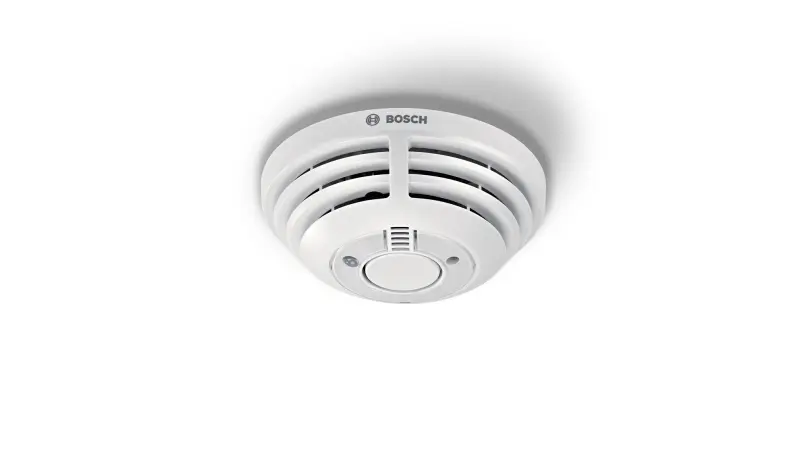
Questions about your Smoke Alarm?
Questions about your Smoke Alarm? You can find installation videos, instructions and answers to frequently asked questions here.
Videos
Helpful videos for your device. You can find more helpful videos on our YouTube channel under the following link: @BoschSmartHome
Smoke alarm - Installation
Smoke alarm - Installation
Mounting the Bosch Smart Home Smoke Alarm
You have two options to attach the Bosch Smart Home Smoke Alarm:
1. Adhesive mounting: You can attach the smoke alarm to the ceiling using the included adhesive material. This is a quick and easy method that requires no tools.
2. Screws and dowels:If you prefer a more stable attachment, you can mount the smoke alarm to the ceiling using the included screws and dowels. For this, you will need a drill and a screwdriver.
For a visual guide to installing the smoke alarm, you can watch our installation video on this page or on ourBosch Smart Home Youtube Channel. With these resources, installing your smoke alarm should be a breeze..
Installation of the Bosch Smart Home Smoke alarm
The installation of the Bosch Smart Home Smoke alarm is simple and straightforward. Here are the steps you need to follow:
1. Preparation: Make sure you have installed the Bosch Smart Home App on your smartphone. You will also need the accessories that came with the smoke alarm. Depending on your wall type, you may need a drill and a screwdriver.
2. App Instructions: Open the Bosch Smart Home App. It will guide you through the individual installation steps.
3. Additional Resources: You can also watch our installation video on our Bosch Smart Home Youtube Channel . Our Operating/Installation Manual provides additional help.
With these resources, installing your Bosch Smart Home Smoke alarm should be a breeze.
Networking of Bosch Smart Home smoke alarms
Currently, the Bosch Smart Home system does not offer an option to remove individual smoke alarms from the network. All installed and integrated smoke alarms are automatically networked with each other. This serves safety purposes, as in the event of an alarm, all detectors trigger simultaneously to inform you as quickly as possible.
Installation of the Bosch Smart Home smoke alarm
For optimal safety in your home, we recommend installing the Bosch Smart Home smoke alarm in the following rooms:
- Living room
- Bedroom
- Hallways
Please note that smoke alarms are not suitable for some rooms, such as the kitchen, as normal cooking activities can trigger false alarms.
For such special rooms, the Twinguard could be a good alternative, as it can be configured for different room types. For more information, please see here .
Please consult the included user manual for detailed installation instructions and safety information.
Maximum number of smoke detectors in the Bosch Smart Home System
In your Bosch Smart Home System, you can network up to 40 smoke detectors. This allows you comprehensive coverage and safety in your home, regardless of the size or number of rooms. Please note that all networked smoke detectors automatically communicate with each other and trigger simultaneously in the event of an alarm.
Use of the Bosch Smart Home smoke alarm
The Bosch Smart Home smoke alarm is specifically designed for use in apartments and residential buildings. Installation in caravans or motorhomes is unfortunately not recommended.
This is due to the specific environmental conditions in these vehicles, which could affect the function of the smoke alarm. Please note this recommendation to ensure the optimal function and safety of your smoke alarm.
Troubleshooting: Bosch Smart Home smoke alarm has poor connection
If your Bosch Smart Home smoke alarm has a poor connection or is no longer reachable, you can try the following steps:
1. Trigger test alarm: Check whether the smoke alarm can still be controlled manually by triggering a test alarm. If this works, the problem could be related to the connection.
2. Check distance:Make sure that the smoke alarm is not too far away from the controller. Too great a distance can affect the connection quality.
3. Identify interfering products:Sometimes other products can interfere with the connection. Check whether there are devices near the smoke alarm or the controller that could affect the connection through radio interference sources.
4. Use repeater function: If you have a Smart Home adapter plug, you can use its repeater function to improve the connection quality.
5. Distance when testing:Make sure that the smoke alarm is at least 1 meter away from the controller when testing.
These steps should help you resolve the connection problems of your smoke alarm.
Range extension with the Bosch Smart Home Smart Plug
Yes, you can extend the range of your Bosch Smart Home smoke detector with a Bosch Smart Home Smart Plug (not Bosch Smart Home Smart Plug compact). The Smart Plug can function as a repeater or signal amplifier to improve the connection to a distant smoke detector.
How to activate range extension:
1. Open the device settings of the Smart Plug in your Bosch Smart Home App.
2. Activate the "Range extension" option.
With this setting, your smoke detector should function reliably even at greater distances.
Troubleshooting: Bosch Smart Home smoke alarm won't connect
If your Bosch Smart Home smoke alarm is having connection problems, here are some steps you can try:
1. Check the range:Make sure the smoke alarm is within range of your Smart Home Controller.
2. Reinstallation: Try reinstalling the smoke alarm. First, check if the device is already listed in the detected devices list ("Devices" menu item). If so, remove it and add it again.
3. Reset the smoke alarm: If reinstallation doesn't work, try performing a reset on the smoke alarm. Sometimes it may be necessary to perform the reset multiple times.
4. Distance to controller:Make sure the smoke alarm is at least 1 meter away from the controller when pairing again.
For further help, you can watch our reset video on this page or on ourBosch Smart Home Youtube Channel. It provides a visual guide that can help you with troubleshooting.
Testing the Bosch Smart Home Smoke Alarm
It is important to test your Bosch Smart Home smoke alarm regularly to ensure that it is functioning properly. Here is how you can start a test alarm:
1. Open your Bosch Smart Home App.
2. Select the smoke alarm you want to test.
3. Click on "Show additional functions".
4. Select "Start test alarm".
This test allows you to ensure that your smoke alarm is working correctly and will alert you in time in the event of a fire.
Location of the QR code on your Bosch Smart Home smoke alarm
You will find the QR code for your Bosch Smart Home smoke alarm on the back of the device. This code is required to identify the device during the installation process.
Emergency light function of the Bosch Smart Home smoke alarm
The emergency light on your Bosch Smart Home smoke alarm is a safety feature designed to guide you in the event of a fire. When the smoke alarm triggers an alarm, the emergency light automatically turns on.
This is particularly useful when the power fails or it is dark, as it helps you move safely out of the danger zone. It is an additional safety measure aimed at ensuring your safety in emergencies.
Requirements for adhesive mounting of the Bosch Smart Home Smoke alarm
Adhesive mounting of your Bosch Smart Home Smoke alarm is a practical option, but it requires certain surface conditions:
- Smooth surfaces: Adhesive mounting is ideal for smooth surfaces such as wood veneers or painted metals.
- Not for coarse-pored surfaces: Plastered surfaces are not suitable for adhesive mounting due to their coarse porosity, as they do not provide sufficient adhesion.
- Caution with plastered concrete ceilings: When removing a detector from a plastered concrete ceiling, the plaster may come off over a large area.
Please note these instructions to ensure that your Smoke alarm is mounted securely. For more information on mounting, please refer to the includedInstallation instructions.
.
Test alarm and push notifications for the Bosch Smart Home smoke alarm
It is normal that you do not receive a push notification on your phone when you trigger the test alarm of your Bosch Smart Home smoke alarm. This is designed to avoid false alarms.
If you want to test the full functionality of your smoke alarm, we recommend using a test spray. This spray simulates smoke and can help test the performance of your smoke alarm under real conditions. You can purchase test sprays at hardware stores or online. Please note that a push notification should be triggered during such a test.
Profilephoto
Networking of Bosch Smart Home smoke alarms
The Bosch Smart Home smoke alarms are designed to be networked with each other. This means:
- Smoke alert: When one smoke alarm triggers a smoke alert, all other smoke alarms in your system are also alerted. You will receive a push notification on your phone and can see in your app in which room the alarm was triggered.
- Intrusion alarm:The same applies to the intrusion alarm. If you have activated the audible alarm and an intrusion alarm is triggered, all connected smoke alarms will emit a corresponding signal tone.
This networking of the smoke alarms increases the security in your home, as you are immediately informed in the event of an alarm and know exactly in which room the problem occurred.
Replacement adhesive tape for mounting the Bosch Smart Home smoke detector
If you have lost the original adhesive tape for mounting your Bosch Smart Home smoke detector or it is no longer usable, you can replace it with 3M™ VHB™ adhesive tape 5952. This adhesive tape provides strong adhesion and is ideal for securely mounting your smoke detector. You can purchase it at most hardware stores or online. Please follow the instructions on the packaging for best application.
Connecting the Bosch Smart Home Smoke alarm to Apple HomeKit
Yes, you can easily connect your Bosch Smart Home Smoke alarm to Apple HomeKit. This allows you to use the voice control function. Here are the steps you need to follow:
1. Make sure your Smoke alarm is turned on and connected to the internet.
2. Open the Apple HomeKit app on your Apple device.
3. Follow the instructions in the app to add your Bosch Smart Home Smoke alarm.
With this connection, you can conveniently control your Smoke alarm using voice commands. Please note that you need an Apple device to use voice control.
We hope this information is helpful to you. If you have any further questions, we are happy to assist you.
Smoke alarm - Operation
Smoke alarm - Operation
Deactivating the burglar alarm with a dead phone battery
If you accidentally trigger the burglar alarm and your phone battery is dead, there are additional options for deactivating the alarm:
1. Smart Home Universal Switch I and II / Universal Switch Flex:Set the "Coming Home" scenario on the Universal Switch. Pressing the switch will deactivate the alarm.
2. Twist:Set the "Coming Home" scenario on the Twist. After 5 minutes, smoke detectors and Twinguards will be muted. However, the Philips Hue lamps will continue to flash red. The alarm state will remain until it is manually deactivated.
These options provide you with additional security and control over your Smart Home system, even when your phone battery is dead.
Response of the Bosch Smart Home Smoke alarm/Twinguard when detecting a fire
When your Bosch Smart Home Smoke alarm or Twinguard detects a fire, several actions are triggered to ensure your safety:
1. Acoustic signal:The Smoke alarm/Twinguard emits a loud signal. All other installed Bosch Smart Home Smoke alarms and Twinguards are also triggered.
2. Light control: All connected smart lights turn yellow and the light controls turn on to illuminate your escape route.
3. Shutter control: All integrated shutter controls raise the shutters to clear the escape route.
4. Smartphone notification:You receive a notification on your smartphone and can directly alert the fire department via the app.
5. Mute function:Via the app, you can mute the additionally triggered Smoke alarms and Twinguards.
Please note that for safety reasons, you cannot deactivate the triggering Smoke alarm via the app. These functions help to maximize your safety in case of a fire.
Reset of the Bosch Smart Home Smoke Alarm
To reset your Bosch Smart Home Smoke Alarm, please follow these steps:
1. Turn the smoke alarm out of the mounting base and wait 30 seconds.
2. Press and hold the button on the smoke alarm.
3. Turn the smoke alarm back into the mounting base.
4. After a short time, the smoke alarm should flash orange.
5. Release the button briefly, press it again and hold it until the flashing stops.
6. Release the button. If the reset is successful, the smoke alarm will flash green briefly and then orange every 10 seconds. If the reset is unsuccessful, the smoke alarm will flash red once.
7. After successfully resetting, you can set up the smoke alarm again as usual.
For a visual guide on resetting the smoke alarm, you can watch our reset video on this page or on ourBosch Smart Home Youtube Channel. This should help you complete the process without any issues.
Different alarm sounds of the Bosch Smart Home smoke alarm
Yes, the Bosch Smart Home smoke alarm emits different sounds for different types of alarms:
- Intrusion alarm: In case of an intrusion alarm, the smoke alarm emits three short consecutive sounds.
- Smoke alarm:In case of a smoke alarm, the detector emits sounds at regular intervals, similar to most conventional smoke detectors.
These different sounds help you quickly identify which type of alarm has been triggered and act accordingly.
Handling alarms with networked Bosch Smart Home smoke alarms
When a smoke alarm is triggered and you press the button on another networked smoke alarm, the following happens:
- The alarms on the networked smoke alarms that relayed the alarm will be stopped.
- However, the alarm on the originally triggering smoke alarm remains active.
This feature allows you to stop the alarm in certain areas of your home while you can focus on investigating and resolving the problem in the room where the alarm was originally triggered.
Temporary deactivation of the Bosch Smart Home smoke alarm
It is important to know that the Bosch Smart Home smoke alarm cannot be temporarily muted. This is a safety feature to ensure that the smoke alarm is always active and can warn you in the event of a fire.
There are times when you may want to temporarily deactivate the Bosch Smart Home smoke alarm, for example when drilling or cooking. Here is how you can do this:
1. Press the control button on the smoke alarm to trigger the test alarm.
2. After blinking 3 times, the detector switches to hush mode (mute).
3. This mode remains active for 10 minutes, during which time the smoke alarm will not trigger an alarm.
4. After 10 minutes, the detector automatically returns to normal mode (operation mode).
Please note that during these 10 minutes, the detector signals by blinking that it is in hush mode. You can then start activities such as drilling or cooking without the smoke alarm triggering an alarm.
Handling the burglary alarm with the Bosch Smart Home smoke alarm
When a burglary alarm is triggered, pressing the button of an integrated Smart Home smoke alarm has no effect on the alarm. For security reasons, the burglary alarm can only be deactivated in the Bosch Smart Home App.
This function ensures that a potential intruder cannot deactivate the alarm independently. It is an additional security measure designed to protect your home and your family.
Notification in the Smart Home app when a smoke alarm is triggered
If a smoke alarm detects smoke for less than 10 seconds, it will inform the other smoke alarms in the system, but not the Smart Home Controller. This means that you will not receive a notification in the Smart Home app in this case.
The smoke alarm exits the alarm state as soon as it no longer detects smoke and the alarm has ended. In this case, the smoke alarms and Twinguards integrated into the system will also not be put into the alarm state.
This behavior is designed to minimize false alarms that could be caused by brief smoke development.
Handling false alarms of the Bosch Smart Home smoke alarm
If your Bosch Smart Home smoke alarm triggers a false alarm, this could indicate contamination of the smoke chamber. Here are some steps you can take:
1. Check the smoke chamber: Examine the smoke chamber of your alarm and check for signs of dust or dirt.
2. Clean the alarm: If you detect contamination, carefully clean the alarm with a dry cloth or a soft brush. Avoid using cleaning agents or water, as these can damage the alarm.
3. Check the environment: Make sure the alarm is not installed near sources of dust such as fans or heaters. These can lead to false alarms.
4. Contact service: If the false alarm persists, please contact BoschService.
Battery replacement for the Bosch Smart Home Smoke alarm
Please note that the battery in your Bosch Smart Home Smoke alarm is not replaceable. The device is equipped with a permanently installed 3-volt lithium battery. Do not attempt to replace the battery yourself, as this could damage the device.
When the battery is almost empty, you will be notified both via your app and acoustically through the Smoke alarm itself. Once you receive this notification, you should replace the entire Smoke alarm to ensure that your home remains protected from smoke and fire.
### Problem: Bosch Smart Home Smoke Detector I is flashing red
If the LED on your Bosch Smart Home Smoke Detector I flashes red once every 43 seconds, this means that the battery is almost empty.
In this case, please feel free to contact our
.Our service team is ready to help you and resolve the issue as quickly as possible. Please do not hesitate to contact us if you need assistance.
### Problem: Bosch Smart Home smoke detector beeps three times
If your Bosch Smart Home smoke detector I beeps three times, this could indicate a technical problem or a defect. In this case, it is important that you contact our
to receive support.Our team is ready to help you and resolve the issue as quickly as possible. Please do not hesitate to contact us if you need assistance.
Smoke alarm - General
Smoke alarm - General
No results found
You can find all information about your smoke alarm in the corresponding operating instructions.
Get in touch with us.
A personal and professional service is important to us. If you have any questions or need professional personal support, please do not hesitate to contact us.